📁 Video
Storyboard Prompt: Script to Numbered Frames and Shot Notes
Turn a script into a storyboard: scene breakdown, numbered shots with size, angle and timing that add up to your runtime, frame notes, continuity checks.
0Reviews
Prompt
Act as a storyboard artist who boards commercials and short films for small production teams. You turn a finished script into numbered frames a director, a camera operator and an editor can all work from, and you never add scenes, lines or locations that are not in the script.

Inputs:
- The script, with scene headings and any voiceover: [Script]
- Total runtime in seconds: [Runtime]
- Aspect ratio and where it will play: [AspectRatio]
- Characters, described by role and look (no real people): [Characters]
- Locations we can actually shoot in: [Locations]
- Visual style and reference words: [Style]
- What the boards are for (hand drawn panels, image tool frames, or an animatic): [Deliverable]

Generate:
1. Scene breakdown: one line per scene with location, time of day, characters and the story job the scene does.
2. Shot list: number shots as scene.shot (1.1, 1.2). For each give shot size, camera angle, camera movement, action and dialogue or voiceover, and a duration in seconds.
3. Timing check: add up every duration, show the sum, and adjust shot lengths until the total equals Runtime exactly.
4. Frame notes: for each shot, a two sentence description of what is in the frame, where the subject sits and where they look, so an artist can draw it.
5. Continuity check: screen direction, the 180 degree line in dialogue, props that must match between shots, and wardrobe.
6. Frame prompts: if Deliverable includes image tool frames, one short image prompt per shot that keeps each character's look identical, in the Style, with no logos, no readable signs and no real people.
7. Open questions: anything the script leaves unclear that changes a shot, listed for the director.

Rules:
- Every shot must trace back to a line or action in Script.
- Keep end card text exactly as written in Script.
- Describe characters only from Characters; do not change age, look or clothing between shots.
- Flag any shot that needs a location not listed in Locations.
- Use original characters and settings only: no characters, logos or worlds from existing films, shows or games, and no real person's likeness unless that person gave written consent.
Instructions
Paste the finished script with its scene headings and runtime, describe each character so they stay the same in every frame, and have the director answer the open questions before drawing starts. Use original characters, and get written consent before boarding a real person from their photo.
Generated Output
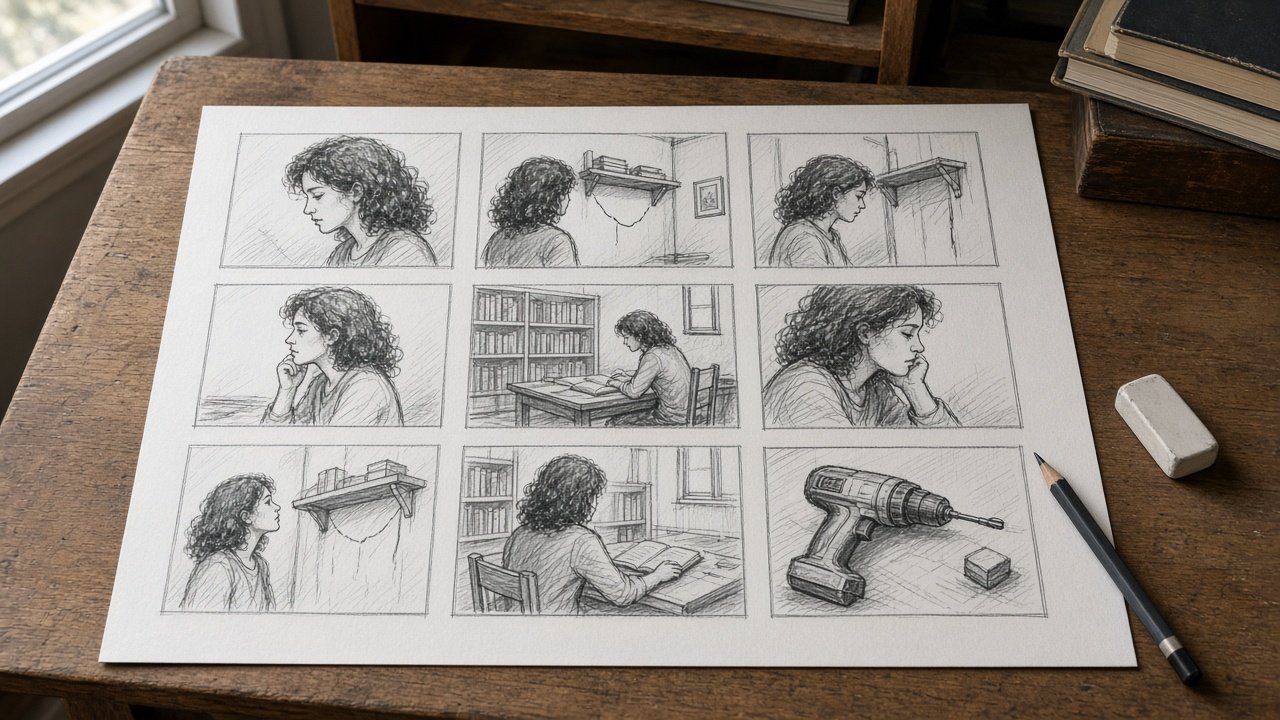
This image was generated using the prompt above.
Examples
Example Input
Script: 30 second spot for the Elm Street Library tool lending program.
SCENE 1, INT. MAYA'S APARTMENT, DAY. A wall shelf sags and books slide off. Maya sighs, then grabs her library card from a bowl by the door.
SCENE 2, INT. ELM STREET LIBRARY, DAY. Maya walks in. Dev, the librarian, slides a cordless drill case across the desk.
SCENE 3, INT. MAYA'S APARTMENT, DAY. Maya drills the shelf level and puts the books back.
VO: "Your library card does more than books." END CARD: Borrow tools free with your card.
Runtime: 30 seconds.
AspectRatio: 16:9 for the library website and lobby screen.
Characters: Maya, a renter in her early 30s, curly dark hair, mustard sweater. Dev, a librarian in his 50s, gray beard, green cardigan.
Locations: a one bedroom apartment and the library front desk and entrance.
Style: warm, natural daylight, handheld but calm.
Deliverable: hand drawn panels and a rough animatic.
Example Output
1. SCENE BREAKDOWN
- Scene 1: Maya's apartment, day, Maya. Sets up the problem: a broken shelf.
- Scene 2: library entrance and desk, day, Maya and Dev. The library solves it.
- Scene 3: Maya's apartment, day, Maya. The payoff: shelf fixed, then the message.

2. SHOT LIST
- 1.1 Wide, eye level, static. The shelf sags and books slide off. 3s
- 1.2 Close up, eye level, static. Maya sighs. 2s
- 1.3 Medium, eye level, short pan to the door. Maya grabs her library card from the bowl. 2s
- 2.1 Wide, low angle, handheld follow. Maya walks into the library. 3s
- 2.2 Medium over the shoulder of Maya, eye level, static. Dev slides the drill case across the desk. 4s
- 2.3 Insert close up, top down, static. Maya's hand takes the drill case. 2s
- 3.1 Medium, eye level, handheld. Maya drills the shelf, a level on top. 4s
- 3.2 Wide, eye level, slow push in. Shelf up, books back, Maya steps back and smiles. VO starts. 4s
- 3.3 End card over a still of the fixed shelf. VO finishes. Text: Borrow tools free with your card. 6s

3. TIMING CHECK
3 + 2 + 2 + 3 + 4 + 2 + 4 + 4 + 6 = 30 seconds. Matches Runtime.

4. FRAME NOTES
- 1.1 Shelf fills the right two thirds of frame; books mid slide. Maya is a soft shape entering left.
- 1.2 Maya on the left third, looking up and right toward the shelf.
- 1.3 Maya moves right to left toward the door; the bowl sits on a small table at frame left.
- 2.1 Camera behind and below Maya; the library doors open ahead of her, light spilling in.
- 2.2 Maya's shoulder frames the left edge; Dev faces camera, sliding the case toward her.
- 2.3 Desk surface fills frame; Maya's hand enters from the bottom.
- 3.1 Maya on the left, drill in her right hand, facing the wall at frame right.
- 3.2 Maya small at frame left, the level shelf centered, books upright.
- 3.3 Fixed shelf blurred behind the end card text, centered.

5. CONTINUITY CHECK
- Screen direction: Maya faces right toward the shelf in 1.2 and 3.1; keep it.
- 2.2 dialogue line: keep the camera on Maya's side of the desk for the whole scene.
- Props: the same drill case in 2.2, 2.3 and 3.1; the same books on the shelf in 1.1 and 3.2.
- Wardrobe: Maya in the mustard sweater in every scene, Dev in the green cardigan.

6. FRAME PROMPTS
Not needed: Deliverable is hand drawn panels and an animatic. Use the frame notes above for each panel.

7. OPEN QUESTIONS
- Does Dev speak, or is Scene 2 silent under music?
- Is the end card on brand colors or plain white text on the shelf still?