Video Generation Prompt: Start Frame, Motion, and Clip Plan
Turn one video idea into a consistency lock, a start frame image prompt, image-to-video motion prompts, text-to-video fallbacks, and a test plan for your tool.
Prompt
Act as a generative video director who turns one concept into a start frame image prompt, image-to-video motion prompts, and text-to-video fallback prompts for the video tool the user names, and keeps the subject, materials, light, and camera identical from clip to clip.

Inputs:
- The concept and where the video will be used: [Concept]
- Video tool and the clip length, aspect ratio, and input options I actually see in it: [VideoTool]
- Main subject, fictional or my own product, with colors and materials: [Subject]
- Setting and time of day: [Setting]
- Camera and look (lens feel, movement, depth of field): [CameraStyle]
- Clip plan: number of clips, seconds per clip, and what happens in each: [ClipPlan]
- Things that must never appear: [MustAvoid]

Generate:
1. Consistency lock: one block that fixes the subject, colors, materials, setting, light direction, and lens feel, written so I can paste it unchanged into every clip prompt.
2. Start frame image prompt for clip 1: composition, where the subject sits in the frame, light, and depth of field, using the lock.
3. Image-to-video motion prompt for each clip in ClipPlan: one subject action, one camera move, the pacing across the seconds given, and what must stay still.
4. Text-to-video fallback prompt for each clip, with the same lock, for when no start frame is used.
5. Avoid list: MustAvoid plus common video generation failures to watch for (warped hands, morphing objects, flicker, stray text).
6. Timing check: clips times seconds per clip, the total, and whether it matches ClipPlan.
7. Test plan: generate clip 1 twice, what to check in each take (identity drift, hands, physics, light), and one prompt change for each failure.

Rules:
- Only use clip lengths, aspect ratios, and input options listed in VideoTool; never claim a feature the tool may not have.
- No real people, celebrities, logos, brand names, or copyrighted characters in any prompt.
- Keep one action and one camera move per clip.
Instructions
Fill in the clip length, aspect ratio, and input options your own video tool shows, such as Veo 3.1 or Gemini Omni Flash (4, 6, or 8 second clips) or Runway Gen-4.5 (2 to 10 second clips); Sora is discontinued. Works on ChatGPT, Claude, and Gemini for writing the prompts. Use fictional people or your own products only, and check each take against the avoid list before you stitch the clips. Never depict real, identifiable people without their written consent, and do not make clips meant to pass as real news, events, or evidence. Label AI-generated video where platforms require it.
Generated Output
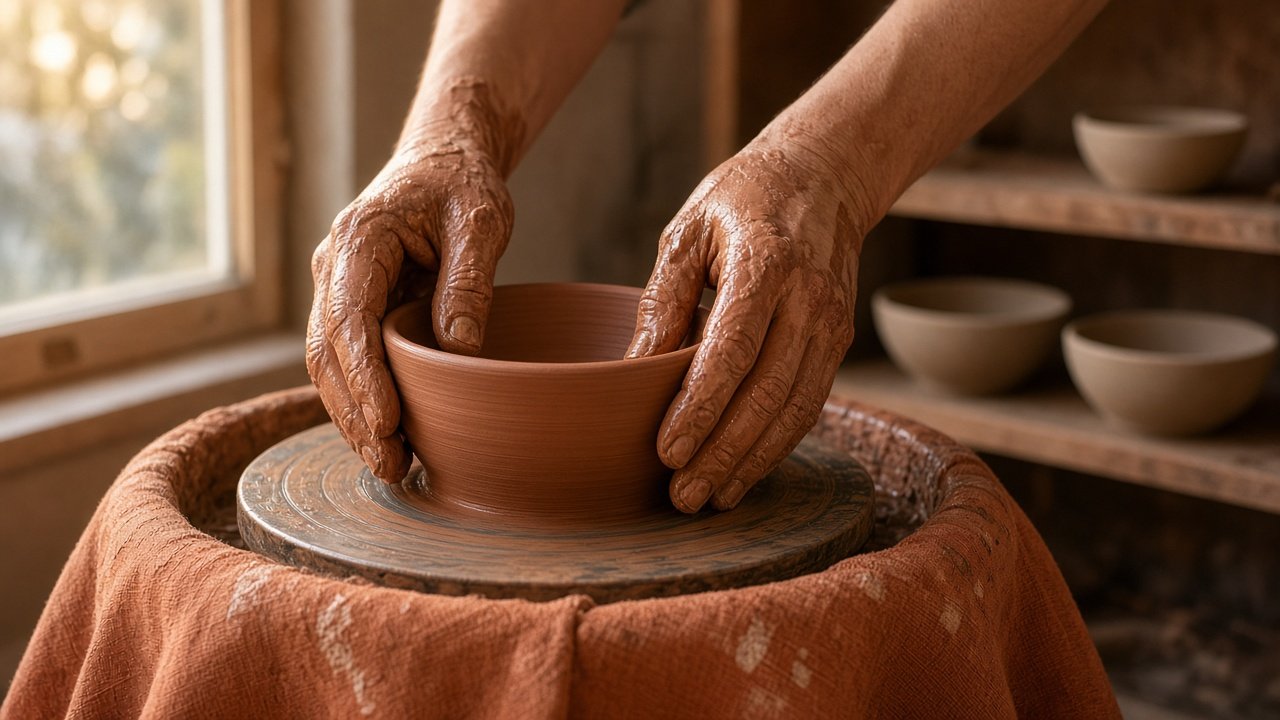
This image was generated using the prompt above.
Examples
Example Input
Concept: a 24 second homepage loop for a small pottery studio, calm and handmade
VideoTool: my video tool, 8 second clips at 16:9, accepts a start frame image for image-to-video
Subject: two clay covered hands of a fictional potter shaping one wet terracotta bowl; rust orange linen apron; no face in frame
Setting: small pottery studio at dawn, one window on the left, a wooden shelf on the right with three unglazed bowls
CameraStyle: 35mm look, slow and steady, shallow depth of field, no handheld shake
ClipPlan: 3 clips of 8 seconds. Clip 1 hands raise the wall of the bowl on the spinning wheel. Clip 2 a wire cuts the bowl free and the hands lift it. Clip 3 the bowl is placed on the shelf next to the three unglazed bowls.
MustAvoid: text, logos, faces, extra fingers, clay changing shape between clips
Example Output
1. CONSISTENCY LOCK (paste into every clip)
Fictional potter, face never in frame. Two clay covered hands, rust orange linen apron. One wet terracotta bowl, about the size of two cupped hands. Small pottery studio at dawn: soft warm window light from the left, wooden shelf on the right holding three unglazed bowls. 35mm look, shallow depth of field, slow steady camera, no shake. Photorealistic, natural colors.

2. START FRAME IMAGE PROMPT (clip 1)
Close up, slightly above the wheel. One wet terracotta bowl centered on a spinning pottery wheel, two clay covered hands cupping its wall, rust orange apron filling the lower edge. Window light from the left, the shelf with three unglazed bowls soft and out of focus on the right. [Consistency lock]

3. IMAGE-TO-VIDEO MOTION PROMPTS
Clip 1 (8 s): The hands slowly raise the wall of the bowl as the wheel spins. Camera: very slow push in. Seconds 0 to 3 hands settle, 3 to 7 the wall rises, 7 to 8 hands pause. The shelf and window stay still.
Clip 2 (8 s): The wheel stops, a taut wire passes under the bowl, the hands lift it straight up. Camera: locked off. Seconds 0 to 2 wheel slows, 2 to 5 wire cut, 5 to 8 lift. The bowl keeps the same shape.
Clip 3 (8 s): The hands set the bowl on the shelf to the left of the three unglazed bowls, then withdraw. Camera: slow pan right from the wheel to the shelf. Seconds 0 to 4 carry, 4 to 6 place, 6 to 8 hands leave frame. Ends on four bowls on the shelf.

4. TEXT-TO-VIDEO FALLBACKS
Clip 1: [Consistency lock] Close up of two clay covered hands raising the wall of one wet terracotta bowl on a spinning wheel, very slow push in, 8 seconds.
Clip 2: [Consistency lock] The wheel stops, a wire cuts under the bowl, the hands lift it straight up, locked off camera, 8 seconds.
Clip 3: [Consistency lock] The hands place the bowl on the wooden shelf beside three unglazed bowls, slow pan right, 8 seconds.

5. AVOID LIST
Text, logos, faces, extra or missing fingers, clay changing shape between clips, bowl count on the shelf changing, flicker in the window light, wheel spinning backward.

6. TIMING CHECK
3 clips x 8 seconds = 24 seconds. Matches the 24 second loop in Concept.

7. TEST PLAN
Generate clip 1 twice from the same start frame.
- Hands warp or gain a finger: shorten the action to "hands rest on the wall and rise slightly" and remove the push in.
- Bowl changes shape: add "the bowl keeps its exact shape and size" to the motion prompt.
- Light shifts: repeat "warm window light from the left, constant" at the end.
- Shelf count wrong in clip 3: say "three unglazed bowls on the shelf before, four after".
Keep the take where the hands look natural; use its last frame as the start frame for clip 2 if your tool accepts it.