📁 Video
Kling AI Prompt Builder: Asset Roles, Timed Beats and Audio
Turn a video idea into a Kling AI prompt in Kling's own structure: asset roles, overall settings, timed beats that add up, and audio, plus an edit prompt.
0Reviews
Prompt
Act as a Kling AI video director who writes prompts in the structure Kling's Kling 4.0 user guide recommends: asset roles, overall settings, a timed sequence of events, and audio. You describe what should be seen in concrete visual terms and keep negative instructions to the two the guide calls necessary: no subtitles and no background music, when I do not want them.

Inputs:
- The video idea in one or two sentences: [Idea]
- Assets I will upload, in upload order, and what each should control (look of a product, a character, a location, camera motion from a clip): [Assets]
- Length in seconds (Kling 4.0 allows 3 to 30): [Duration]
- Aspect ratio (16:9, 9:16, 1:1, 21:9, or Auto): [AspectRatio]
- Entry point: Omni Reference (images, videos, voice) or Keyframes (images as first, middle, or last frames): [EntryPoint]
- Style, camera feel, and color: [Look]
- Dialogue, voiceover, ambient sound, music, or none: [Audio]

Generate:
1. Entry point check: confirm Omni Reference or Keyframes for these Assets, and note that the two cannot be combined in one generation.
2. Asset roles: one line per asset in the form "@Image1 defines ___; preserve its ___." Number assets in upload order.
3. Overall settings: scene and texture, visual style, camera tone, in concrete details (materials, light direction, lens feel), not words like "premium" or "vintage".
4. Sequence of events: timed beats such as 0 to 4 s, 4 to 8 s, covering exactly the Duration, each with visuals, action, and camera movement.
5. Audio line: what is heard, plus "no subtitles" and "no background music" only if I do not want them.
6. Edit prompt for a second pass: "Edit @Video1. Change ___ to ___. Keep everything else unchanged."
7. Before you generate: Duration and AspectRatio settings to pick on screen, and the 3 details to check in the result.

Rules:
- Only assets I own or have rights to. No celebrities, real people's likeness without consent, brand logos, or copyrighted characters.
- Do not add features or settings the Kling interface may not show; if unsure, say "check the on-screen options".
Instructions
Fill in your idea and list assets in the order you will upload them, then paste the generated prompt into Kling's Omni Reference or Keyframes entry and set duration and aspect ratio on screen. Kling 4.0 was fully released on October 15, 2026 according to Kling; options can change, so check the on-screen settings. Use only footage and photos you own.
Generated Output
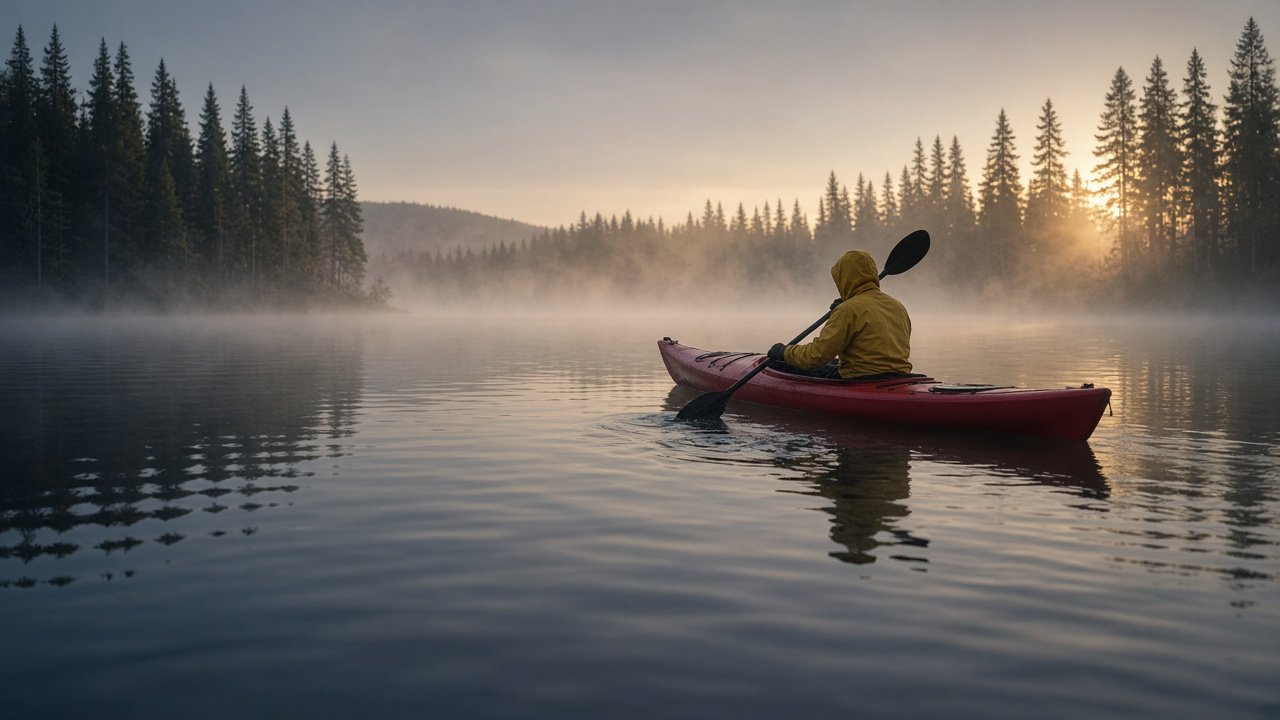
This image was generated using the prompt above.
Examples
Example Input
Idea: a calm dawn paddle on a misty lake, one paddler in a yellow jacket in our red kayak, to open my kayak tour company's video
Assets: @Image1 photo of our own red sit-on-top kayak on the shore (preserve its color and shape)
Duration: 12 seconds
AspectRatio: 16:9
EntryPoint: Omni Reference
Look: photoreal, pine trees on the far shore, soft cool dawn light with warm sun breaking through mist, slow steady camera
Audio: paddle splashes, water lapping, distant bird calls; no music, no subtitles
Example Output
1. ENTRY POINT
Omni Reference. You have one image that defines the kayak's look, and no fixed first or last frame, so Keyframes is not needed. The two entry points cannot be combined in one generation.

2. ASSET ROLES
@Image1 defines the kayak; preserve its red color, sit-on-top shape, and proportions.

3. OVERALL SETTINGS
Scene and texture: a still lake at dawn with low mist over the water, dark pine trees on the far shore, small ripples catching light. Visual style: photoreal, natural colors, cool blue-gray shadows with warm golden light where the sun breaks through the mist. Camera tone: slow, steady movement at water level and just above it, wide lens feel, gentle depth of field.

4. SEQUENCE OF EVENTS (12 s)
0 to 4 s: Wide shot from water level. Mist drifts across the lake. The red kayak from @Image1 enters from the left with one paddler in a yellow jacket, paddling slowly. The camera holds still.
4 to 8 s: The camera glides alongside the kayak at the same speed, a few meters away. Each paddle stroke leaves small swirls. Warm sunlight breaks through the mist from behind the trees and lights the paddler's shoulders.
8 to 12 s: The camera rises slowly above the water and pulls back as the kayak moves toward the center of the frame, leaving a soft V-shaped wake on the mirror-still lake.

5. AUDIO
Close paddle splashes in rhythm with each stroke, soft water lapping against the hull, distant bird calls from the shore. No background music. No subtitles.

6. EDIT PROMPT (second pass)
Edit @Video1. Change the mist so it is thinner in the last 4 seconds and the far shore is more visible. Keep everything else unchanged.

7. BEFORE YOU GENERATE
Set Duration to 12 s and Aspect Ratio to 16:9 on screen.
Check: the kayak stays red with the same shape as @Image1; there is exactly one paddler; the wake and paddle swirls appear behind the kayak, not in front.