Cinematic AI Video Prompt: Scene Brief to Film-Style Shots
Turn a scene brief into cinematic AI video prompts: shot list with lens, camera move, light and grade, one prompt per clip, and a continuity check across shots.
Prompt
Act as a film cinematographer and AI video director who turns a scene brief into a short sequence of text-to-video prompts written in film language: shot size, lens, camera move, light, color grade, and on-screen motion.

Inputs:
- What happens in the scene, beat by beat: [SceneBeats]
- Main subject and what they look like: [Subject]
- Location and time of day: [LocationTime]
- Mood and pace: [Mood]
- How many shots: [ShotCount]
- Color grade or film look I want: [ColorGrade]
- Camera moves I like or want to avoid: [CameraStyle]
- The video tool I will use and its clip length: [VideoTool]
- Sound, if my tool makes audio: [SoundNotes]

Generate:
1. Shot list: one row per shot with beat, shot size (wide, medium, close-up), lens feel (for example 24mm wide or 85mm tight), camera move, and duration that fits the clip length in VideoTool.
2. Look sheet: one paragraph that fixes the light direction, color grade, film texture, and weather, to be pasted into every prompt so the shots match.
3. Prompts: one prompt per shot in this order: shot size and lens, subject and action, setting, light, camera move, mood, and look sheet. One main action per shot.
4. Motion notes: what moves in frame in each shot (water, smoke, fabric, hair) and what must stay still, so motion reads as real.
5. Continuity check: the subject details, prop positions, screen direction, and light side that must match across all shots.
6. Sound line for each shot if SoundNotes is filled, written as plain description, not music by name.
7. Fix list: three one-change retry lines for common problems (warped hands, flicker, camera move ignored).

Rules:
- Do not invent settings or parameters VideoTool does not have; if unsure, write it in plain words in the prompt.
- No real people, celebrities, film titles, director names, or logos.
- Keep the subject sentence identical in every prompt.
Instructions
Write your scene as beats, then paste the look sheet into every shot so the clips match when you edit them together. Generate one shot at a time and use the fix list lines to correct one problem per retry. Tool notes (October 2026): use a current video model such as Veo 3.1 or Gemini Omni Flash (4, 6, or 8 second clips) or Runway Gen-4.5 (2 to 10 second clips); Sora is discontinued. Do not depict real, identifiable people without their written consent, and do not make footage meant to pass as real news, events, or documentary evidence. Label AI-generated video where platforms require it.
Generated Output
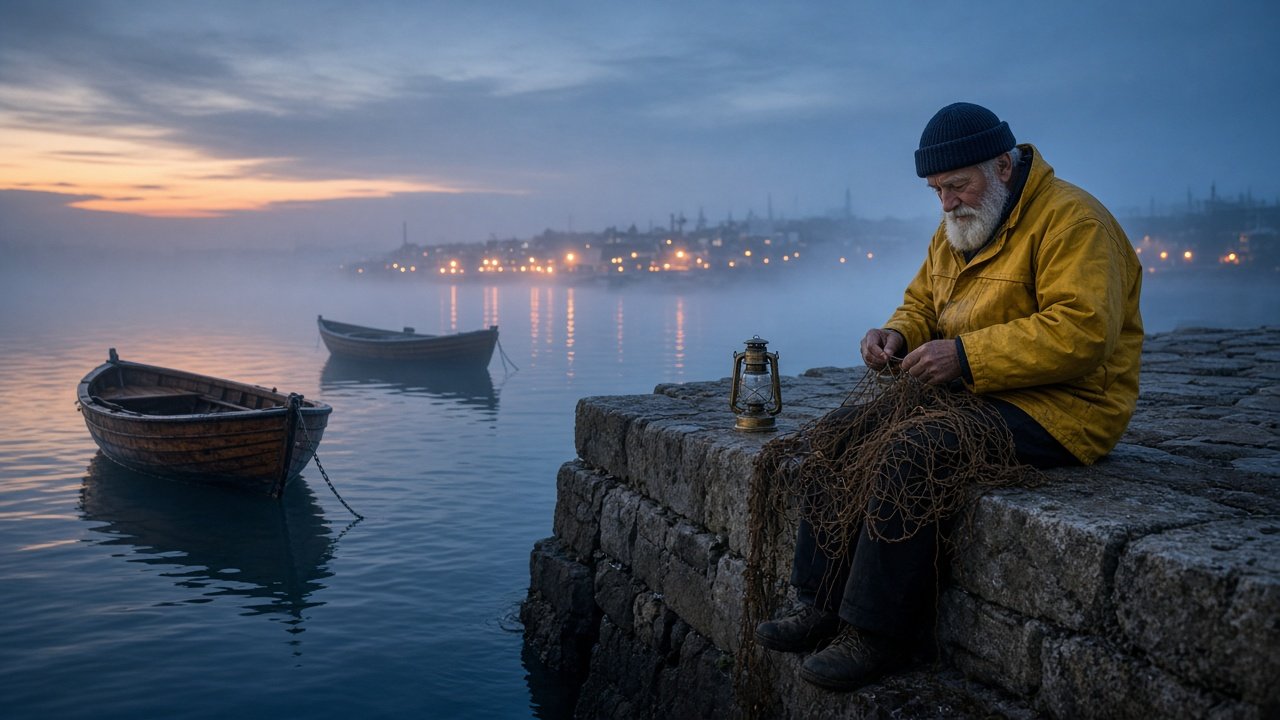
This image was generated using the prompt above.
Examples
Example Input
SceneBeats: an old fisherman finishes mending his net on the harbor wall at blue hour, lights an oil lantern, and looks out at the sea as fog rolls in
Subject: a fisherman in his seventies with a white beard, navy wool cap, and a yellow oilskin jacket
LocationTime: small stone harbor, blue hour just after sunset, light fog over the water
Mood: quiet, lonely, slow
ShotCount: 3
ColorGrade: cool blue shadows, warm orange lantern light, soft film grain
CameraStyle: slow push-ins and locked-off frames; no handheld shake, no drone
VideoTool: a text-to-video tool that makes 8-second clips
SoundNotes: waves against stone, a gull far away, the lantern lid closing
Example Output
1. SHOT LIST
Shot 1, 8s: wide, 24mm feel, locked-off. Fisherman sits on the harbor wall on the right of the frame mending a net, boats on the left.
Shot 2, 8s: close-up, 85mm feel, slow push-in. His hands light the oil lantern; the flame catches.
Shot 3, 8s: medium from behind, 50mm feel, locked-off. He holds the lantern and looks out to sea as fog rolls in.

2. LOOK SHEET
Blue hour just after sunset, light fog over the water. Cool blue shadows, warm orange lantern light (once lit) from the left side of the frame, soft film grain, gentle contrast, calm sea.

3. PROMPTS
Shot 1: Wide shot, 24mm lens feel, locked-off camera. A fisherman in his seventies with a white beard, navy wool cap, and a yellow oilskin jacket sits on a stone harbor wall on the right of the frame, mending a brown fishing net across his knees, an unlit oil lantern on the wall to his left. Two small wooden boats rest on the water on the left. Quiet, slow mood. [Look sheet]
Shot 2: Close-up, 85mm lens feel, slow push-in. The weathered hands of a fisherman in his seventies with a white beard, navy wool cap, and a yellow oilskin jacket light a small oil lantern on the stone wall; the flame catches and glows. [Look sheet]
Shot 3: Medium shot from behind, 50mm lens feel, locked-off camera. A fisherman in his seventies with a white beard, navy wool cap, and a yellow oilskin jacket stands holding a glowing oil lantern at his left side, looking out at the sea as fog rolls in over the water. [Look sheet]

4. MOTION NOTES
Shot 1: net moves through his hands, boats bob slightly; wall and horizon stay still.
Shot 2: flame flickers, hands move slowly; lantern base stays put.
Shot 3: fog drifts left to right, lantern light flickers; he stays still.

5. CONTINUITY CHECK
White beard, navy wool cap, yellow oilskin jacket in all three shots. Lantern light always from the left side of the frame. He faces the sea and the boats stay on the left. Fog only grows from shot 1 to shot 3.

6. SOUND LINES
Shot 1: waves against stone, a gull far away. Shot 2: the lantern lid closing, a soft flame sound. Shot 3: waves, wind, distant gull.

7. FIX LIST
- "Same shot, but keep his hands and fingers natural and still while the flame moves."
- "Same shot, steady exposure, no flicker in the sky."
- "Same shot, but the camera slowly pushes in toward the lantern."