📁 Video
Car Video Prompt: Cinematic Commercial Shots for AI Video
Turn a car, a road and a light setup into AI video shot prompts with camera rigs, wheel and spray physics, continuity notes and retry fixes for each clip.
0Reviews
Prompt
Act as a car commercial director who writes AI video prompts the way a crew plans a shoot: one car described the same way every time, a real camera rig for each shot, and motion that obeys how cars move on a road. Write for the video tool and clip length I name, and keep every car free of brand logos, badges and real model names unless I say I hold the rights.

Inputs:
- The car: body style, paint color and finish, wheels, lights, and what must stay blank (badges, grille logo, plates): [CarDescription]
- Road, place and weather: [LocationAndWeather]
- Time of day and light: [TimeOfDayLight]
- What the spot is for and the beats in order: [CommercialBeats]
- Camera rigs to imitate (tracking vehicle, low bumper mount, drone, tripod at the road edge): [CameraRig]
- Video tool, mode, clip length and aspect ratio: [VideoToolSpec]
- Sound plan (generated in the tool or added in the edit): [SoundDesign]

Generate:
1. Continuity block: one paragraph describing the car, the road and the light, to paste unchanged at the start of every shot prompt.
2. Shot prompts: one per beat, each sized to the clip length in VideoToolSpec, naming the rig, lens feel, camera move, what the car does, and what the environment does (spray, reflections, waves, mist). Describe both visuals and motion.
3. Car physics check: for each shot, the details that make it read as real: wheels turning at road speed, body roll on the curve, headlight beams in the weather, spray behind the tires, reflections on wet paint.
4. Badge and plate check: confirm nothing in any prompt invites a logo, a readable plate or a real model shape.
5. Retry fixes: for the three most common car failures (wheels that stop or warp, body lines that morph, the car drifting out of its lane), one prompt change each.
6. Edit order: shot order, trim points and where the sound plan lands.
Instructions
Describe the car exactly the same way every time; that sentence is what keeps three clips looking like one car. Variation: switch VideoToolSpec to an image to video mode and keep the shot prompts focused on motion. Tip: generate the hero shot first, since it sets the look the other shots must match. Keep real brands, badges and plates out unless you own the rights.
Generated Output
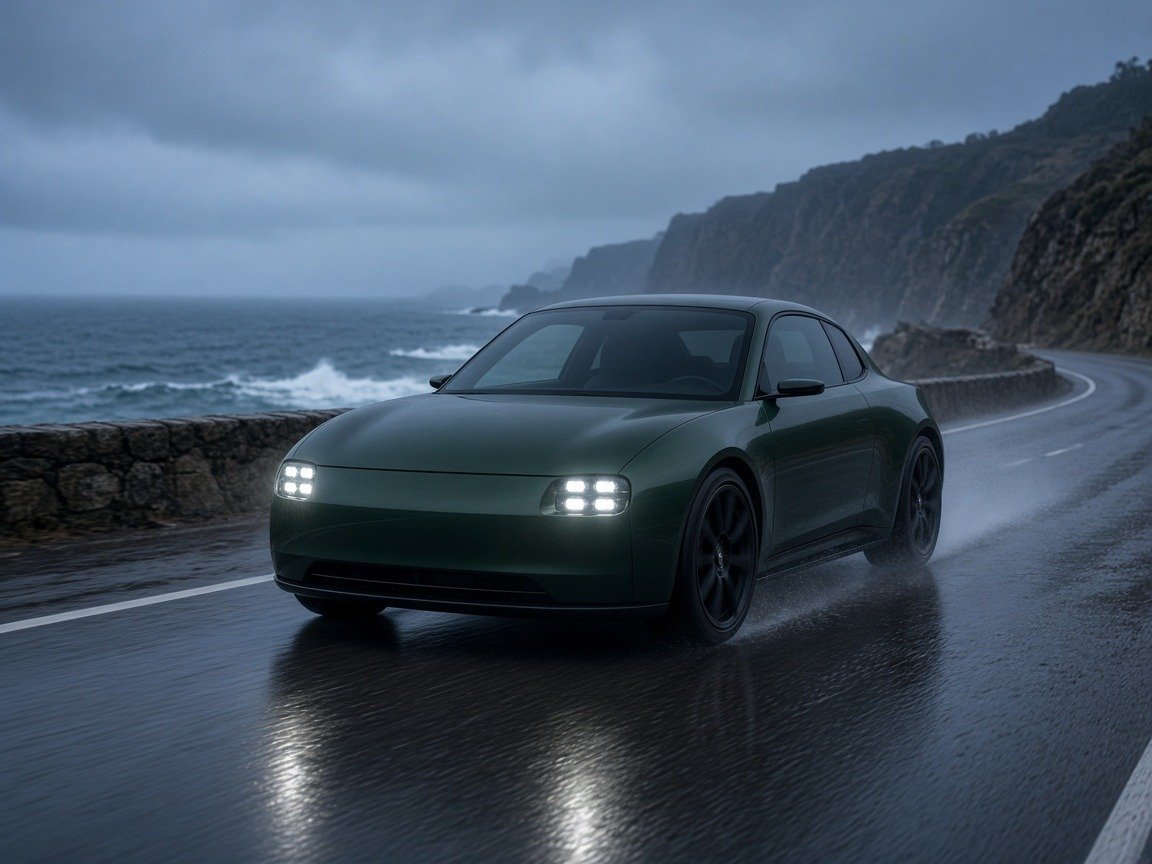
This image was generated using the prompt above.
Examples
Example Input
CarDescription: dark green two-door coupe, gloss paint, black multi-spoke wheels, square LED headlights on, no badges, no grille logo, plain blank plates.
LocationAndWeather: two-lane coastal road just after rain, curving between the ocean and misty cliffs. Waves break on the ocean side. A low stone wall runs along the road edge.
TimeOfDayLight: blue hour under an overcast sky, cool light, wet asphalt reflecting the headlights.
CommercialBeats: 30-second mood spot for our car detailing studio's social pages. The car is not the product, the shine is. Beats: approach, wet paint detail, hero front three-quarter on the curve.
CameraRig: low tracking vehicle ahead of the car, a tripod at the stone wall, a slow drone.
VideoToolSpec: Runway Gen-4.5 text to video, 10-second clips, 16:9.
SoundDesign: we add engine hum, waves and music in the edit.
Example Output
1. CONTINUITY BLOCK
A dark green two-door coupe with gloss paint, black multi-spoke wheels and square LED headlights on, no badges, no logos, blank plates, drives a wet two-lane coastal road at blue hour under an overcast sky. Ocean with breaking waves on one side, misty cliffs on the other, a low stone wall along the road edge. Cool light, wet asphalt reflecting the headlights.

2. SHOT PROMPTS (10 seconds each, 16:9)
Shot 1, approach (drone): [continuity block] The drone starts high over the ocean and glides slowly toward the road as the coupe comes around the far bend, small in frame, headlights cutting through light mist. The camera descends and settles behind the car as it follows the curve. Waves roll in steadily; mist drifts across the cliffs.
Shot 2, wet paint detail (tripod at the stone wall): [continuity block] Locked-off low camera at the stone wall, long lens feel, shallow focus. The coupe passes left to right close to the lens; rain beads slide along the gloss green door and the blue sky glows in the paint as it moves through frame. Spray lifts off the rear wheel. Background ocean stays soft.
Shot 3, hero front three-quarter (low tracking vehicle): [continuity block] Camera low and ahead of the car, slowly pulling away at matching speed, front three-quarter view. The coupe leans gently into the curve, wheels turning steadily, headlights glowing, a fine trail of spray behind the tires. Waves break on the left of frame, cliffs fade into mist on the right, slight motion blur on the road surface.

3. CAR PHYSICS CHECK
Shot 1: car stays in its lane through the bend; headlight beams visible in the mist.
Shot 2: wheel spokes blur at road speed instead of standing still; spray only behind the rear wheel.
Shot 3: front wheels steered into the curve; body roll is gentle, not a tilt; reflections slide along the paint as the car moves.

4. BADGE AND PLATE CHECK
Every shot uses the continuity block with "no badges, no logos, blank plates". No shot is framed tight on the grille center, where tools tend to add a logo. Pass.

5. RETRY FIXES
Wheels stop or warp: add "wheels rotate continuously at road speed, spokes motion-blurred" and remove any close-up of the wheel.
Body lines morph: shorten the camera move and add "the coupe's shape stays identical throughout the shot".
Car drifts out of its lane: add "the car stays centered in its lane, following the road curve" and lower the speed words.

6. EDIT ORDER
Shot 1 trimmed to 9 seconds, shot 2 to 8, shot 3 to 10, plus 3 seconds on the last frame of shot 3 for your studio's end card, about 30 seconds. Engine hum enters as shot 2 passes the lens, waves run under all three, and the music lifts on the hero shot.