ChatGPT Prompt to Vectorize Image: 12 for Clean SVG Art
A ChatGPT prompt to vectorize an image works best in two steps: redraw as flat art, then trace. 12 prompts with Inkscape and Illustrator settings to try.
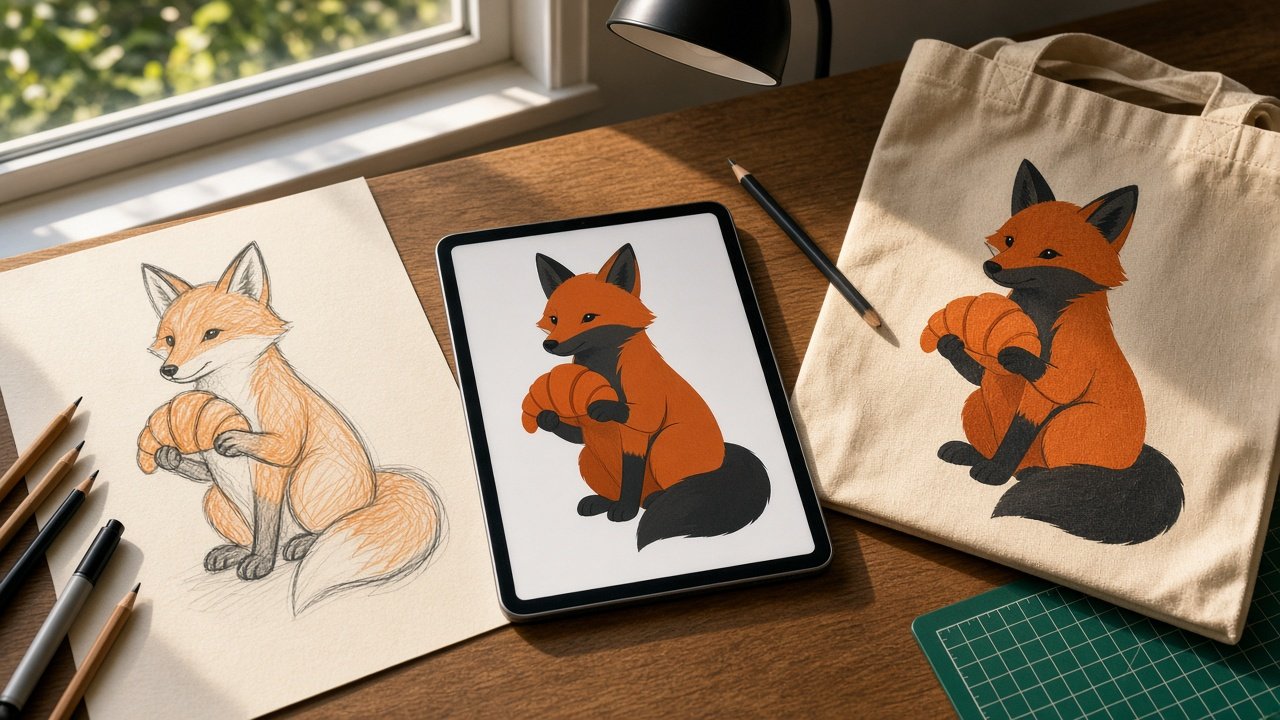
The best ChatGPT prompt to vectorize image files does not ask for an SVG at all; it asks for trace-ready art. ChatGPT Images outputs pixels, and its help pages do not offer SVG export, so the reliable route is two steps: have ChatGPT redraw your picture as flat, high-contrast artwork, then trace that file in Inkscape, Illustrator, or another vector editor. The 12 prompts below cover both steps plus cleanup and print checks.
Why a direct SVG request disappoints
If you ask a chat model to "convert this to SVG", you usually get one of two things: a raster image that only looks clean, or hand-written SVG code that rebuilds the picture from a few circles and curves. That code can be fine for a simple geometric icon. For a sketch, a photo, or an old logo, a real tracer such as Inkscape's Trace Bitmap or Illustrator's Image Trace does the path work far better, and ChatGPT's job is to prepare the input and plan the settings.
Prepare the image
1. Trace forecast
Here is my image: [describe or attach]. It will be used for [screen print, vinyl cut, engraving, web icon]. Tell me which parts will trace cleanly, which will break into speckles, and what to simplify before tracing.
2. Flat redraw for tracing
Redraw the attached image as flat vector-style artwork: [number] solid colors only ([colors]), bold even outlines, no gradients, no shading, no texture, plain white background, no text. Keep [details that must survive].
3. One-color silhouette
Turn the attached drawing into a single black silhouette on white with clear gaps between [parts], suitable for a one-color vinyl cut at [size].
4. Thicken thin lines
Redraw this line art with every line at an even, heavier weight and closed shapes wherever lines nearly touch, so a tracer reads them as solid paths. Keep proportions identical.
Trace and clean
5. Inkscape settings plan
I use Inkscape [version]. My redraw has [number] colors on white. Give me the Trace Bitmap mode, number of scans, and options to start from, and what to change if the preview looks blobby or jagged.
6. Illustrator Image Trace plan
I use Adobe Illustrator. For a [number]-color flat image, which Image Trace preset and settings should I start with in the Image Trace panel, and when should I choose Expand?
7. Cleanup order
List the steps, in order, to clean a fresh trace of [subject] in [software]: remove the background shape, delete specks, simplify nodes, smooth curves, and merge same-color pieces.
8. Simple icon as SVG code
Write clean SVG code for a [simple geometric icon] on a [size] viewBox using only basic shapes and paths, two fills ([colors]), no text. Explain each element in one line so I can edit it.
Print and production
9. Color separation plan
My artwork uses [colors] for a [print method]. Assign each shape to an ink, show where colors touch, and list the questions to ask my printer about trap and overprint.
10. Size check
The design prints at [size]. List the thinnest lines and smallest gaps I should measure, and draft a short message asking my printer or cutter for their minimum line weight and gap.
11. Export checklist
I am sending this vector to [printer, cutter, engraver, developer]. List the file formats, settings, and file names to deliver, and what to keep as an editable master.
12. Side-by-side review
Compare my traced version to the original as I describe them: [notes]. List every shape that changed meaning, such as merged eyes, lost points, or filled gaps, and how to fix each in [software].
Worked example
A bakery wanted a child's marker drawing of a fox holding a croissant printed on canvas totes in two inks, rust orange and charcoal, at 10 inches wide. The flagship prompt flagged the pencil guide lines, soft belly shading, and a paper shadow as trace problems, then wrote a redraw prompt that kept the tilted head, curled tail, and the croissant's three ridges.
For Inkscape 1.4 it set Path, Trace Bitmap, Multiple scans, Colors, 3 scans with Stack scans and Remove background, then a cleanup order of ungroup, delete specks, Simplify one press at a time, and union by color. It also drafted the question for the printer about minimum line weight at that size instead of guessing a number. Get the full vectorize image prompt with trace settings.
Variations by end use
- Vinyl cutting: one color, closed shapes, and a request for weeding notes on small islands.
- Laser engraving: ask for a black and white version and which areas should be filled versus outlined.
- Web icons: skip tracing and use prompt 8 for hand-editable SVG on a small grid, or generate native vector icons with the Recraft SVG icon set guide.
Habits that save rework
- Trace the largest clean version you have; small JPGs give jagged edges no setting can fix.
- If the redraw shows a checkerboard, that pattern is baked into the pixels; ask for plain white and remove the white shape after tracing.
- Only trace art you own or have permission to use, and keep the original next to the trace when you review.
More print and design prompts
If you are building a mark from scratch, start with the ChatGPT prompt for logo design. For apparel, see the t-shirt design prompts and the screen print separation spec prompt; for stickers, the die-cut sticker sheet prompt.
Explore the Design prompts hub, browse all prompts, or share a prompt you use.