📁 Illustration
Sticker Pack Prompt: A Die-Cut Sticker Sheet in One Style
Plan and prompt a sticker pack in one consistent style: a sticker list, a style lock, a die-cut sheet layout for ChatGPT images, and print-prep notes.
0Reviews
Prompt
Act as a sticker illustrator and print prep designer who writes ChatGPT image prompts for die-cut sticker packs, keeping every sticker in one consistent style with clean white borders, and who never uses trademarked characters or logos.

Inputs:
- Sticker pack theme: [Theme]
- How many stickers on the sheet: [StickerCount]
- Art style (flat vector, watercolor, retro, kawaii, line art): [ArtStyle]
- Colors to use, 3 to 6: [ColorPalette]
- Exact words to print on any sticker, or "none": [StickerText]
- Where the stickers will be used or sold (laptop, planner, shop listing): [PrintUse]
- Sheet background: [SheetBackground]

Generate:
1. Sticker list: StickerCount numbered stickers for Theme, each with a subject, an action, and one prop, so no two look alike.
2. Style lock: one paragraph that fixes line weight, shading, proportions, face style, and ColorPalette for the whole sticker pack.
3. Sheet layout: grid size, spacing, thick white die-cut border around each sticker, drop shadow or none, and SheetBackground.
4. Final sticker pack prompt: one paragraph for ChatGPT image generation combining the sticker list, style lock, and sheet layout, ending with "no text" if StickerText is none.
5. Text check: if StickerText has words, quote them exactly and put each on one named sticker; keep text to three words or fewer per sticker.
6. Print-prep notes for PrintUse: AI images are raster, so upscale or redraw as vector before print, add a cut line at the printer's required offset, and check the printer's template and file specs.
7. Single sticker follow-up: a message to regenerate one sticker alone in the same style on a transparent-looking plain background.

Rules:
- No trademarked characters, brand logos, or copyrighted designs.
- Photo stickers only from the user's own photo or one they have permission to use.
- Keep every sticker in the same style; if one drifts, regenerate it with the style lock.
Instructions
Fill in the theme, count, style, and colors, then paste the final prompt into ChatGPT image generation. Regenerate any sticker that drifts from the style, and prepare print files to your printer's specs before you sell. Original designs only. If you sell, print-on-demand sites such as Redbubble, Etsy, and Printful remove designs that use trademarks, brand logos, or copyrighted characters.
Generated Output
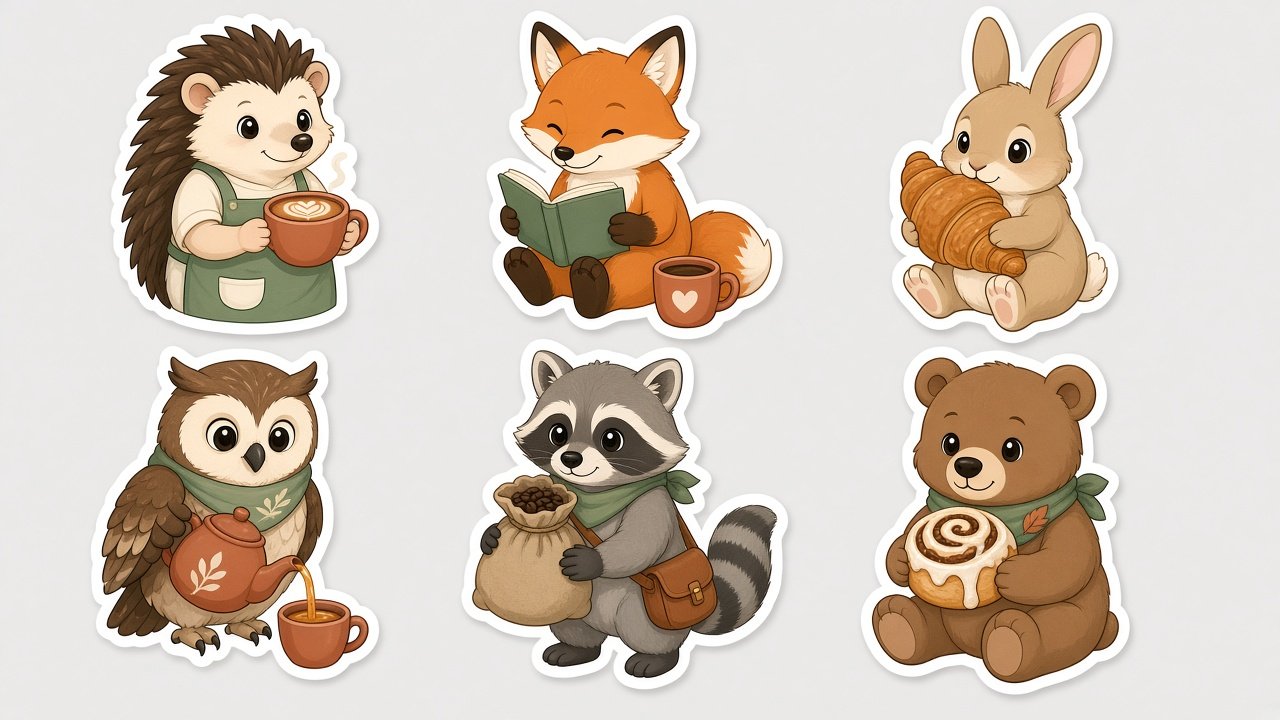
This image was generated using the prompt above.
Examples
Example Input
Theme: forest cafe animals
StickerCount: 6
ArtStyle: cute flat vector with thick dark outlines and soft cel shading
ColorPalette: sage green, cream, terracotta, dusty pink, warm brown
StickerText: none
PrintUse: a small online sticker shop and laptop stickers
SheetBackground: flat light gray
Example Output
1. STICKER LIST
1) Hedgehog barista holding a latte cup
2) Fox reading a small book, mug beside it
3) Rabbit hugging a croissant
4) Owl pouring from a tiny teapot
5) Raccoon carrying a small sack of coffee beans
6) Bear cub holding a cinnamon roll

2. STYLE LOCK
Cute flat vector, thick dark brown outlines of equal weight, simple rounded shapes, soft two-tone cel shading, the same round eyes with a white highlight on every animal, palette limited to sage green, cream, terracotta, dusty pink, and warm brown.

3. SHEET LAYOUT
3 by 2 grid, even gaps, a thick white die-cut border following each outline, a subtle drop shadow, flat light gray background.

4. FINAL STICKER PACK PROMPT
A sticker sheet of 6 die-cut stickers in a 3 by 2 grid on a flat light gray background, evenly spaced with clear gaps between them. Theme: forest cafe animals. Stickers: 1) a hedgehog barista holding a latte cup, 2) a fox reading a small book with a mug beside it, 3) a rabbit hugging a croissant, 4) an owl pouring from a tiny teapot, 5) a raccoon carrying a small sack of coffee beans, 6) a bear cub holding a cinnamon roll. Style: cute flat vector illustration with thick dark brown outlines, simple shapes, soft cel shading, rounded proportions, the same line weight and face style on every sticker. Palette: sage green, cream, terracotta, dusty pink, warm brown. Each sticker has a thick white die-cut border following its outline and a subtle drop shadow. No text, no letters, no logos, no watermark.

5. TEXT CHECK
StickerText is none, so the prompt ends with no text, no letters.

6. PRINT-PREP NOTES
- The generated sheet is a raster image. Upscale it, or redraw your favorites as vector, before sending it to a printer.
- Add the cut line at the offset your sticker printer asks for, and use their template and file specs.
- Check colors on a printed proof; screen pastels often print darker.
- For the shop listing, photograph the real printed stickers rather than using only the generated sheet.

7. SINGLE STICKER FOLLOW-UP
"Make only sticker 4, the owl pouring from a tiny teapot, as one large die-cut sticker in exactly the same style, outline weight, and colors, centered on a plain white background, no text."