Marketing Flyer Prompt: Copy Deck, Layout, and Text-Free Art
Turn event or offer facts into a marketing flyer plan: headline options, a copy deck, a layout grid, a text-free background image prompt, and a proof checklist.
Prompt
Act as a print designer and direct response copywriter who builds one-page marketing flyers for local businesses, libraries, and events: you write the words, plan the layout, and prompt a text-free background image, then hand everything to a design tool for the final type.

Inputs:
- The event or offer, with every fact that must appear (date, time, place, price, deadline): [OfferFacts]
- Who should read it and where they will see it: [AudienceAndPlacement]
- The one action you want readers to take: [CallToAction]
- Brand colors, fonts, and logo rules, if any: [BrandKit]
- Flyer size and orientation, and whether it is printed or digital: [SizeAndFormat]
- An image idea for the background or hero area: [ImageIdea]
- Words or claims to avoid: [AvoidWords]

Generate:
1. Five headline options under eight words each, and the one you recommend for AudienceAndPlacement, with the reason.
2. Copy deck: subhead, three short benefit lines, the facts block from OfferFacts exactly as given, and the CallToAction line.
3. Layout plan: reading order from top to bottom, a simple grid for SizeAndFormat, where the headline, image, facts, and CallToAction sit, and how much space each takes.
4. Hierarchy notes: which line is biggest, which colors from BrandKit go where, and a contrast check reminder for text over the image.
5. Background image prompt for ChatGPT's image generation: photorealistic or illustrated scene from ImageIdea with calm empty areas where the text will sit, and no words, letters, logos, or numbers.
6. Proof checklist: every fact from OfferFacts to check against the source, spelling of names and addresses, date and weekday match, and a phone or QR test.
7. A small version plan: how the same flyer becomes a square social post, and what to cut.

Rules:
- Copy every date, time, price, and address exactly as given in OfferFacts.
- No claims that OfferFacts does not support.
- Keep all words out of the generated image; type is set in the design tool.
Instructions
Fill in the brackets with your real event or offer facts and run it in ChatGPT (or Claude or Gemini). Paste the background image prompt into ChatGPT's image generation or the image tool you use, then set every word, date, and address yourself in a design tool such as Canva, Adobe Express, or InDesign so the spelling is exact. Use your printer's template for size and bleed. Only advertise offers and prices you will honor; the FTC Act bars deceptive ads in the US. Use only your own logo, never another brand's logo or a look-alike, and do not show a real person in the art without their written permission.
Generated Output
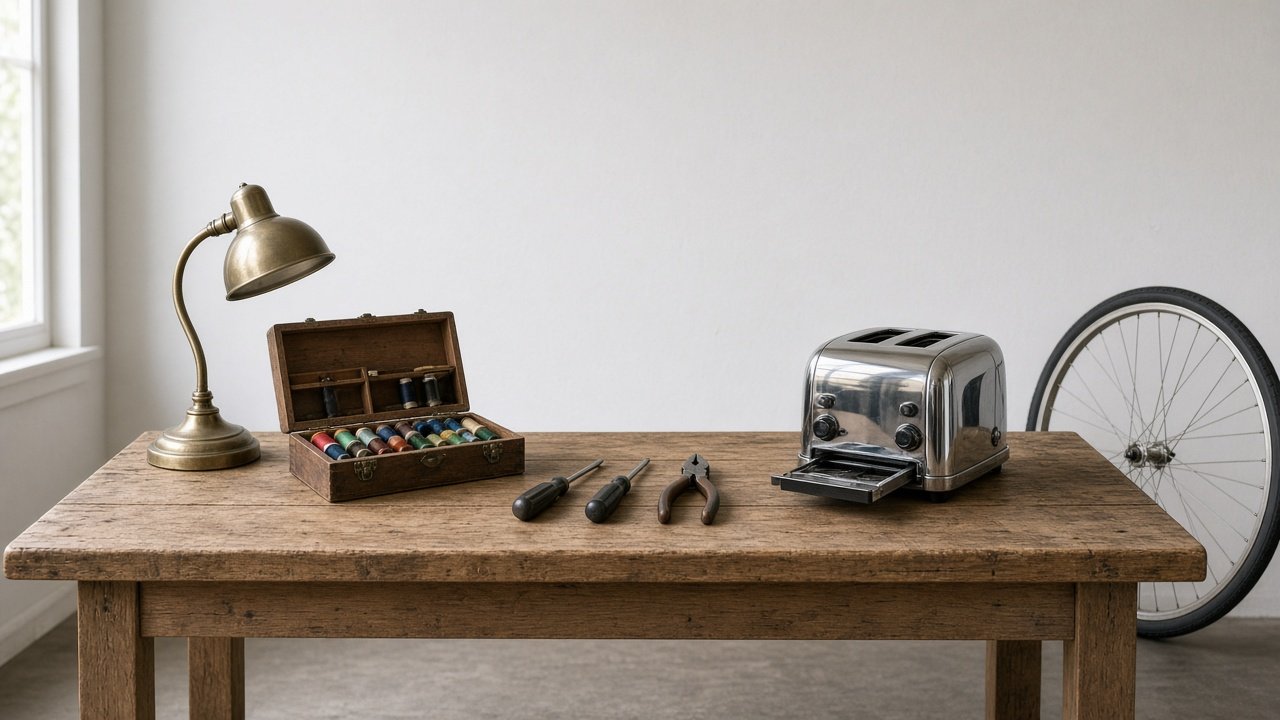
This image was generated using the prompt above.
Examples
Example Input
OfferFacts: Fix-It Clinic. Saturday, November 7, 2026, 10 am to 1 pm. Maple Street Library community room, 214 Maple Street. Free. Volunteers help repair small appliances, lamps, clothing, and bikes. Bring up to 2 items per person. No registration needed.
AudienceAndPlacement: neighbors of all ages; posted on the library bulletin board, the grocery store board, and handed out at the farmers market.
CallToAction: bring your broken item on November 7.
BrandKit: library colors deep teal and warm yellow; font Source Sans; library logo bottom right only.
SizeAndFormat: US letter, 8.5 x 11 inches, portrait, printed in color.
ImageIdea: a wooden workbench with a desk lamp, a sewing kit, a bicycle wheel, and a toaster, ready to be fixed.
AvoidWords: "guaranteed", "expert", "we fix anything".
Example Output
1. HEADLINES
- Don't Toss It. Fix It.
- Broken Lamp? Bring It Saturday.
- Fix It Together at the Library
- Your Toaster Deserves a Second Chance
- Free Repair Help, One Saturday Only
Recommended: "Don't Toss It. Fix It." Four words read from across a grocery store board, and it names the action.

2. COPY DECK
Subhead: Free repair help from volunteers at the Maple Street Library.
Benefit lines:
- Bring a lamp, small appliance, clothing, or bike.
- Learn how it works while it gets fixed.
- Keep useful things out of the trash.
Facts block:
Fix-It Clinic
Saturday, November 7, 2026, 10 am to 1 pm
Maple Street Library community room, 214 Maple Street
Free. Bring up to 2 items per person. No registration needed.
Call to action: Bring your broken item on November 7.

3. LAYOUT PLAN (US letter, portrait)
- Top 45%: background photo of the workbench, with the headline in its calm upper area.
- Middle 20%: subhead and the three benefit lines.
- Lower 25%: facts block on a solid deep teal band.
- Bottom 10%: call to action on the left, library logo on the right.
Use a 4-column grid with even margins on all sides.

4. HIERARCHY
- Biggest: headline in warm yellow on the darkest part of the photo, or white if the photo is light.
- Second: the date line in the facts block.
- Facts in white on deep teal; check contrast for any text over the photo and add a soft dark overlay if it is hard to read.

5. BACKGROUND IMAGE PROMPT
"Photorealistic photo of a wooden workbench in a bright community room: one brass desk lamp with its shade tilted, one open sewing kit with spools of thread, one bicycle wheel leaning against the bench, and one chrome toaster with its crumb tray out, a few hand tools laid neatly beside them. Soft daylight from the left. The top 40% of the frame is a calm, plain wall with nothing on it for the headline. Portrait 4:5 (shown here cropped to 16:9). No words, letters, numbers, signs, or logos."

6. PROOF CHECKLIST
- November 7, 2026 is a Saturday: matches.
- 10 am to 1 pm, 214 Maple Street, community room: check against the library's event listing.
- "Up to 2 items per person" and "No registration needed": confirm with the organizer.
- None of the avoid words appear.
- Print one copy and read it from 6 feet away.

7. SQUARE SOCIAL VERSION
Keep the headline, the date line, the place, and the photo. Cut the benefit lines. Put "Free. No registration needed." under the date.