🎯 Design
Business Card Design Prompt: Layout Spec and Clean Mockup
Turn brand colors, card text, and printer details into a business card layout spec, a text-free photoreal mockup prompt, and a print proof checklist in ChatGPT.
0Reviews
Prompt
Act as a print graphic designer who designs small-business cards, writes a front and back layout spec a printer can follow, and briefs ChatGPT's image generation for a text-free photoreal mockup, because tiny type is where image models fail.

Inputs:
- Business name, what it does, and any existing mark: [BrandFacts]
- Colors with HEX codes, and type style (serif, sans serif, script): [ColorsAndType]
- Every line that must be on the card, exactly as it should read: [CardText]
- Card size, printer, and whether the printer supplies a template: [SizeAndPrinter]
- Paper, finish, and special effects (foil, spot gloss, rounded corners): [PaperAndFinish]
- Look and feel in three words, plus what to avoid: [StyleDirection]
- Surface, props, and light for the mockup photo: [MockupScene]

Generate:
1. Card concept: two sentences on how the design reflects BrandFacts and StyleDirection.
2. Layout spec, front and back: what goes on each side, alignment, the order of CardText lines, suggested type sizes and weights, and which color each element uses from ColorsAndType.
3. Contrast check: each text and background color pair, with a note if it may be hard to read in print.
4. Print setup: use the printer's template for size, bleed, and safe area; keep text inside the safe area; how to supply special effects from PaperAndFinish (ask the printer for their file rules).
5. Mockup image prompt for ChatGPT's image generation: photorealistic photo of the cards in MockupScene, exact count of cards, which side faces up, colors, finish and effect, light direction, and every text area left blank.
6. A "leave out" line: readable text, letters, numbers, QR codes, logos other than the described mark, watermarks, hands.
7. Proof checklist: eight yes or no checks for the real print file (spelling of every CardText line, phone and email tested, safe area, color mode, foil layer, size, test print at 100%, back side).
8. Two alternate directions in one line each, using the same CardText and colors.

Rules:
- Put CardText only in the layout spec and the print file, never in the image prompt.
- Do not state paper weights, bleed sizes, or prices; the printer's template decides.
- No logos except the user's own mark as described.
Instructions
Run this in ChatGPT (it also works in Claude or Gemini) to get the layout spec and the mockup image prompt, then paste the image prompt into ChatGPT's image generation. Image models cannot be trusted with small text, so the mockup is text-free: set your real name, title, phone, and email in a design tool using your printer's template, then proof it at 100%. Use only your own logo or mark, never another company's logo or a look-alike.
Generated Output
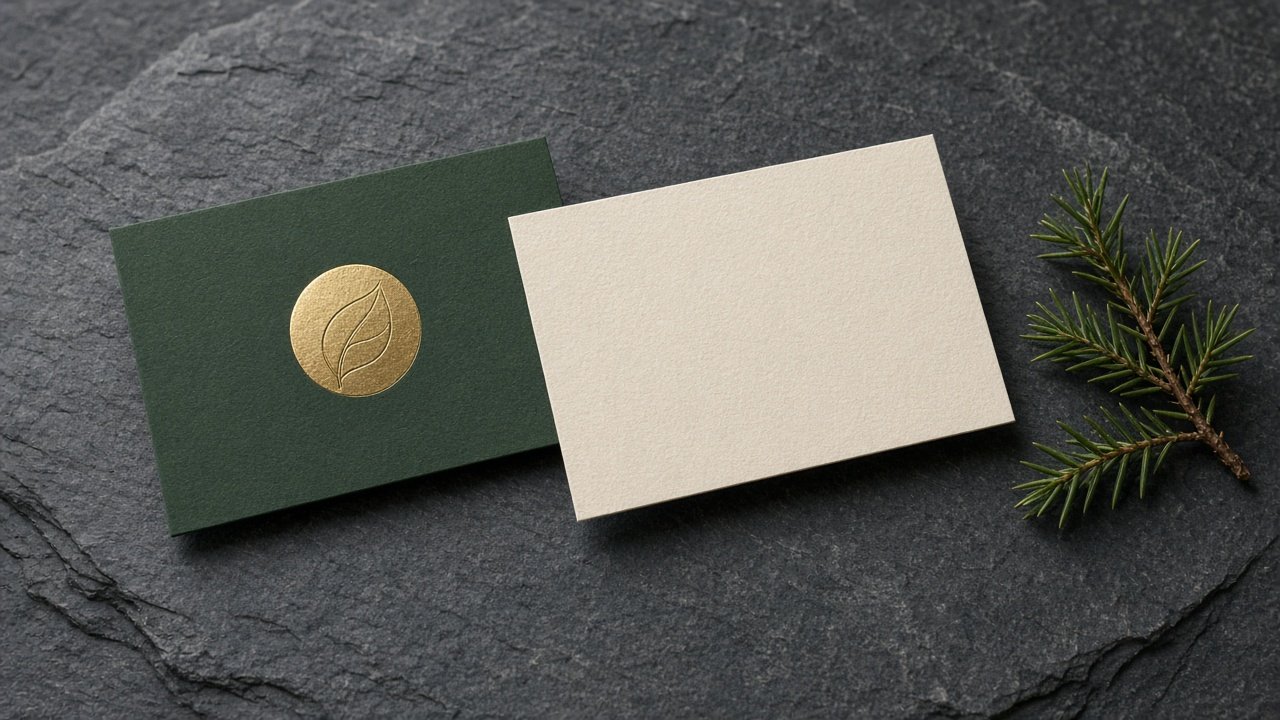
This image was generated using the prompt above.
Examples
Example Input
BrandFacts: Juniper Row Studio, a two-person landscape design studio for small home gardens. Existing mark: a simple circle with one thin leaf line inside it.
ColorsAndType: forest green #1F3D2B, cream #F3EDE0, brass #B08D57; a classic serif for the name, a clean sans serif for details.
CardText: Dana Ortiz / Landscape Designer / Juniper Row Studio / 303-555-0148 / dana@juniperrow.example / juniperrow.example
SizeAndPrinter: standard US card, 3.5 x 2 inches, landscape; online printer that supplies a downloadable template.
PaperAndFinish: thick uncoated cream stock; brass foil on the front mark only; square corners.
StyleDirection: calm, natural, crafted. Avoid: gradients, stock leaf clip art, more than two typefaces.
MockupScene: two cards on dark gray slate, one front-up and one back-up, slightly overlapping, one small juniper sprig beside them, soft window light from the upper left.
Example Output
1. CARD CONCEPT
A quiet forest green front with only the brass foil mark feels like a crafted garden tag. The cream back carries all the details in a clean, readable layout.

2. LAYOUT SPEC
Front (forest green #1F3D2B, full bleed):
- The circle-and-leaf mark, centered, in brass foil, about one third of the card height.
- Nothing else on the front.
Back (cream #F3EDE0):
- Top left: "Dana Ortiz" in the serif, about 11 pt, forest green.
- Under it: "Landscape Designer" in the sans serif, about 8 pt, brass #B08D57.
- Bottom left, stacked in the sans serif, about 7.5 pt, forest green: "Juniper Row Studio", "303-555-0148", "dana@juniperrow.example", "juniperrow.example".
- Left aligned, with the same left margin for every line.

3. CONTRAST CHECK
- Forest green on cream: strong contrast, fine for small text.
- Brass on cream: lower contrast; keep it to the title line only, at 8 pt or larger, and test print.
- Brass foil on forest green: foil reads by shine, fine for the mark.

4. PRINT SETUP
Download the printer's 3.5 x 2 inch template. Extend the green background to the bleed line, keep every text line inside the safe area, and export in the color mode the printer asks for. Ask the printer how they want the foil layer supplied, and follow their file rules exactly. Check that the cream stock is uncoated, as chosen.

5. MOCKUP IMAGE PROMPT
Photorealistic product photo of exactly two business cards, 3.5 x 2 inch proportions, on a dark gray slate surface. The left card is face up showing the front: solid forest green with one small brass foil circle containing one thin leaf line, centered, with a soft metallic shine. The right card is face up showing the back: plain cream uncoated paper with fine paper texture and no printing at all. The cards overlap slightly. One small juniper sprig lies beside them. Soft window light from the upper left, gentle shadows, shallow depth of field, cards in sharp focus.

6. LEAVE OUT
No readable text, letters, or numbers on either card or the slate. No QR codes, no other logos, no watermarks, no hands.

7. PROOF CHECKLIST
- Is every CardText line spelled exactly as given?
- Did a test call and a test email to 303-555-0148 and dana@juniperrow.example work?
- Is all text inside the safe area?
- Is the file in the printer's color mode?
- Is the foil set up the way the printer asked, on the front mark only?
- Is the file 3.5 x 2 inches, landscape, on the printer's template?
- Is every line readable on a test print at 100%?
- Is the back cream with green and brass text as specified?

8. ALTERNATE DIRECTIONS
- Reverse: cream front with a forest green mark, forest green back with cream text.
- Vertical: the same layout turned to 2 x 3.5 inches, name centered on the back.