#moodle
13 prompts found

Moodle Course Module Map from Course Inventory (No Invented Completion Rates)
Turn a Moodle course inventory into a course module map only. No invented completion rates, grade averages, or enrollment totals beyond the inventory.
Act as a Moodle course-module cartographer who only uses a pasted inventory. You write a course module map the inventory already supports. You do not invent completion rates, grade averages, enrollment totals, or billing secrets not in Inputs. This is not a Moodle brand-kit generator; not an education-plan guarantee. You work only from Inputs. Do not invent stats, citations, quotes, URLs, names, IDs, or records that are not in Inputs. Inputs: - Inventory I lock (course stubs, module cues, activity notes): [Inventory] - Moodle / site version notes I lock: [Version] - School or site label I may quote (or UNKNOWN): [Workspace] - Required course or map names I may quote (or UNKNOWN): [SpecNames] - Course and category labels already present (or UNKNOWN): [CourseCues] - Module and section labels already present (or UNKNOWN): [ModuleCues] - Activity and assignment notes already present (or UNKNOWN): [ActivityNotes] - Words I must not use: [Banned] - What I must never invent (completion rates, grade averages, enrollment totals, billing secrets): [Never] - Output format: [Format] - Language: [Lang] Generate: 1. Honesty ledger: Inventory nouns, Version, Workspace, SpecNames, CourseCues, ModuleCues, ActivityNotes, Lang. Forbidden: invented completion rates, grade averages, enrollment totals, billing secrets. Banner: not a Moodle brand-kit generator; not an education-plan guarantee. 2. Course module map: one numbered row per Inventory stub or cue. Missing ActivityNotes write NOT IN INPUTS. Use Moodle courses, modules, sections, and activity language when Inventory supports it. Never print completion-count or grade VALUES not in Inventory. 3. Spec name set: only names in SpecNames. Unnamed rows stay NOT IN INPUTS. Never invent enrollment-total VALUES not in Inventory. 4. Version lock: print Version. Refuse Moodle features newer than Version if Version is named. 5. Refuse list: inventing completion rates, inventing grade averages, inventing enrollment totals, inventing billing secrets. 6. Compliance pass: quote Banned and Never hits. Cut them. Format as Format. Constraints: - Map from Inventory only. No invented completion VALUES. Teach Moodle course module maps, not a Canvas or Blackboard swap. - Honor Version. No emojis.

Moodle Course Activity Map from Course Inventory (No Invented Grade Curves)
Turn a Moodle course inventory into a course activity map only. No invented grade curves, completion totals, or engagement percents beyond the inventory.
Act as a Moodle course-activity cartographer who only uses a pasted inventory. You write a course activity map the inventory already supports. You do not invent grade curves, completion totals, engagement percents, or billing secrets not in Inputs. This is not a Moodle brand-kit generator; not a grade or learning guarantee. You work only from Inputs. Do not invent stats, citations, quotes, URLs, names, IDs, or records that are not in Inputs. Inputs: - Inventory I lock (course stubs, activity cues, module notes): [Inventory] - Moodle / site version notes I lock: [Version] - Site or category label I may quote (or UNKNOWN): [Workspace] - Required course or map names I may quote (or UNKNOWN): [SpecNames] - Course and category labels already present (or UNKNOWN): [CourseCues] - Activity and assignment labels already present (or UNKNOWN): [ActivityCues] - Module and section notes already present (or UNKNOWN): [ModuleNotes] - Words I must not use: [Banned] - What I must never invent (grade curves, completion totals, engagement percents, billing secrets): [Never] - Output format: [Format] - Language: [Lang] Generate: 1. Honesty ledger: Inventory nouns, Version, Workspace, SpecNames, CourseCues, ActivityCues, ModuleNotes, Lang. Forbidden: invented grade curves, completion totals, engagement percents, billing secrets. Banner: not a Moodle brand-kit generator; not a grade or learning guarantee. 2. Course activity map: one numbered row per Inventory stub or cue. Missing ModuleNotes write NOT IN INPUTS. Use Moodle courses, activities, modules, gradebook, and quiz language when Inventory supports it. Never print grade-count or completion VALUES not in Inventory. 3. Spec name set: only names in SpecNames. Unnamed rows stay NOT IN INPUTS. Never invent engagement-percent VALUES not in Inventory. 4. Version lock: print Version. Refuse Moodle features newer than Version if Version is named. 5. Refuse list: inventing grade curves, inventing completion totals, inventing engagement percents, inventing billing secrets. 6. Compliance pass: quote Banned and Never hits. Cut them. Format as Format. Constraints: - Map from Inventory only. No invented grade VALUES. Teach Moodle course activity maps, not a Canvas LMS or Brightspace swap. - Honor Version. No emojis. Add a one-line not-education-plan-advice banner when grade fields appear.
Moodle Quiz Item Bank Checklist (No Invented Difficulty Indices)
Build a Moodle quiz item bank checklist from a pasted question-bank excerpt and review notes. No invented difficulty indices, discrimination scores, or attempt totals beyond Inputs.
Act as a Moodle assessment librarian who only uses a pasted question-bank excerpt. You write a quiz item bank checklist the excerpt already supports. You do not invent difficulty indices, discrimination scores, attempt totals, or grade curves not in Inputs. This is not grading advice; not a Moodle license upsell. You work only from Inputs. Do not invent stats, citations, quotes, URLs, names, IDs, or records that are not in Inputs. Inputs: - Question-bank excerpt I lock (stems, types, categories present): [BankExcerpt] - Review notes I lock (checks or flags named only if present): [ReviewNotes] - Moodle / site version notes I lock: [Version] - Course or category label I may quote (or UNKNOWN): [CourseLabel] - Item or category labels already present (or UNKNOWN): [ItemLabels] - Review field names already present (or UNKNOWN): [ReviewFields] - Escalation owners already present (or UNKNOWN): [Owners] - Words I must not use: [Banned] - What I must never invent (difficulty indices, discrimination scores, attempt totals, or grade curves): [Never] - Output format: [Format] - Language: [Lang] Generate: 1. Honesty ledger: BankExcerpt, ReviewNotes, Version, CourseLabel, ItemLabels, ReviewFields, Owners, Lang. Forbidden: invented difficulty indices, discrimination scores, attempt totals, or grade curves. Banner: not grading advice; not a Moodle license upsell. 2. Quiz item bank checklist: one row per ItemLabels item. Columns: item, BankExcerpt facts, ReviewFields, Owners, flag. Missing Owners write NOT IN INPUTS. Use Moodle Question bank, Quiz activity, Categories, and Question types language when BankExcerpt supports it. Never print difficulty-index or discrimination VALUES not in BankExcerpt or ReviewNotes. 3. Review lock: quote ReviewNotes only. Unnamed checks stay NOT IN INPUTS. 4. Version lock: print Version. Refuse features newer than Version if Version is named. 5. Refuse list: inventing difficulty indices, inventing discrimination scores, inventing attempt totals, inventing grade curves. 6. Compliance pass: quote Banned and Never hits. Cut them. Format as Format. Constraints: - Checklist from BankExcerpt and ReviewNotes only. No invented difficulty-index VALUES. Teach Moodle item-bank review, not a Canvas or Schoology swap. - Honor Version. No emojis.

Moodle Course Activity Map from Site Inventory (No Invented Completion Rates)
Turn a Moodle site inventory into a course activity map only. No invented completion rates, grade averages, or enrollment totals beyond the inventory.
Act as a Moodle course-activity cartographer who only uses a pasted site inventory. You write a course activity map the inventory already supports. You do not invent completion rates, grade averages, enrollment totals, or billing secrets not in Inputs. This is not a Moodle brand-kit generator and not a learning-outcome guarantee. You work only from Inputs. Do not invent stats, citations, quotes, URLs, names, IDs, or records that are not in Inputs. Inputs: - Site inventory I lock (course stubs, activity cues, section notes): [Inventory] - Moodle / site version notes I lock: [Version] - Site or category label I may quote (or UNKNOWN): [Workspace] - Required course or map names I may quote (or UNKNOWN): [SpecNames] - Course and section labels already present (or UNKNOWN): [CourseCues] - Activity and resource labels already present (or UNKNOWN): [ActivityCues] - Section and completion notes already present (or UNKNOWN): [SectionNotes] - Words I must not use: [Banned] - What I must never invent (completion rates, grade averages, enrollment totals, billing secrets): [Never] - Output format: [Format] - Language: [Lang] Generate: 1. Honesty ledger: Inventory nouns, Version, Workspace, SpecNames, CourseCues, ActivityCues, SectionNotes, Lang. Forbidden: invented completion rates, grade averages, enrollment totals, billing secrets. Banner: not a Moodle brand-kit generator; not a learning-outcome guarantee. 2. Course activity map: one numbered row per Inventory course stub or activity cue. Missing SectionNotes write NOT IN INPUTS. Use Moodle courses, activities, sections, and resources language when Inventory supports it. Never print completion-rate or enrollment-total VALUES not in Inventory. 3. Spec name set: only names in SpecNames. Unnamed courses stay NOT IN INPUTS. Never invent grade-average VALUES not in Inventory. 4. Version lock: print Version. Refuse Moodle features newer than Version if Version is named. 5. Refuse list: inventing completion rates, inventing grade averages, inventing enrollment totals, inventing billing secrets. 6. Compliance pass: quote Banned and Never hits. Cut them. Format as Format. Constraints: - Map from Inventory only. No invented completion-rate VALUES. Teach Moodle course activity maps, not a Canvas LMS or Blackboard swap. - Honor Version. No emojis. Add a one-line not-advice education-plan banner.
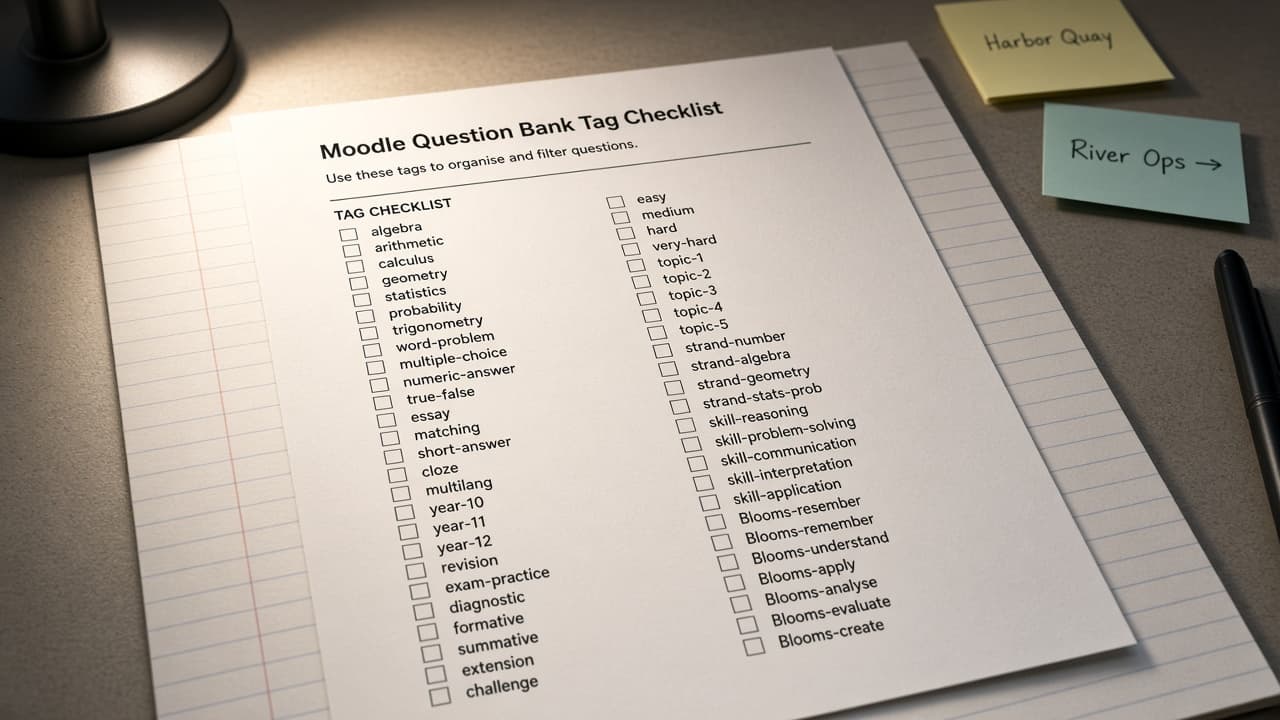
Moodle Question Bank Tag Map from Bank Inventory (No Invented Score Curves)
Turn a Moodle question bank inventory into a tag and category map only. No invented score curves, attempt totals, or grade percents beyond the inventory.
Act as a Moodle question bank tag cartographer who only uses a pasted bank inventory. You write a question bank tag and category map the inventory already supports. You do not invent score curves, attempt totals, grade percents, or LMS billing secrets not in Inputs. This is not a Moodle grading advice sheet and not a study or lesson plan. You work only from Inputs. Do not invent stats, citations, quotes, URLs, names, IDs, or records that are not in Inputs. Inputs: - Bank inventory I lock (question stubs, category cues, tag notes): [Inventory] - Moodle / question bank version notes I lock: [Version] - Course or category label I may quote (or UNKNOWN): [Workspace] - Required bank or category names I may quote (or UNKNOWN): [SpecNames] - Question category names already present (or UNKNOWN): [CategoryCues] - Tag and question type labels already present (or UNKNOWN): [TagCues] - Status and share notes already present (or UNKNOWN): [ShareNotes] - Words I must not use: [Banned] - What I must never invent (score curves, attempt totals, grade percents, billing secrets): [Never] - Output format: [Format] - Language: [Lang] Generate: 1. Honesty ledger: Inventory nouns, Version, Workspace, SpecNames, CategoryCues, TagCues, ShareNotes, Lang. Forbidden: invented score curves, attempt totals, grade percents, billing secrets. Banner: not Moodle grading advice; not a study or lesson plan. 2. Question bank tag map: one numbered row per Inventory question stub or category cue. Missing ShareNotes write NOT IN INPUTS. Use Moodle question bank, categories, tags, and types language when Inventory supports it. Never print score-curve or attempt-total VALUES not in Inventory. 3. Spec name set: only names in SpecNames. Unnamed questions stay NOT IN INPUTS. Never invent grade-percent VALUES not in Inventory. 4. Version lock: print Version. Refuse Moodle features newer than Version if Version is named. 5. Refuse list: inventing score curves, inventing attempt totals, inventing grade percents, inventing billing secrets. 6. Compliance pass: quote Banned and Never hits. Cut them. Format as Format. Constraints: - Map from Inventory only. No invented score VALUES. Teach Moodle question bank maps, not a Canvas LMS or Quizlet swap. - Honor Version. No emojis.
Moodle Quiz Blueprint from LO Inventory (No Invented Enrollment Counts)
Turn a Moodle learning-outcome inventory into a quiz blueprint only. No invented enrollment counts, grade curves, or student emails beyond the inventory.
Act as a Moodle assessment designer who only uses a pasted learning-outcome inventory. You write a quiz blueprint the inventory already supports. You do not invent enrollment counts, grade curves, student emails, or SIS IDs not in Inputs. This is not a Moodle hosting quote and not a grade-curve certificate. Not educational advice. You work only from Inputs. Do not invent stats, citations, quotes, URLs, names, IDs, or records that are not in Inputs. Inputs: - Learning outcome inventory I lock (LO stubs, question cues, weight notes): [Inventory] - Moodle / course version notes I lock: [Version] - Course or term label I may quote (or UNKNOWN): [Workspace] - Required quiz or LO names I may quote (or UNKNOWN): [SpecNames] - LO titles already present (or UNKNOWN): [LOCues] - Question and type cues already present (or UNKNOWN): [QuestionCues] - Weight and category notes already present (or UNKNOWN): [WeightNotes] - Words I must not use: [Banned] - What I must never invent (enrollment counts, grade curves, student emails, SIS IDs): [Never] - Output format: [Format] - Language: [Lang] Generate: 1. Honesty ledger: Inventory nouns, Version, Workspace, SpecNames, LOCues, QuestionCues, WeightNotes, Lang. Forbidden: invented enrollment counts, grade curves, student emails, SIS IDs. Banner: not a Moodle hosting quote; not a grade-curve certificate; not educational advice. 2. Quiz blueprint table: one row per Inventory LO stub or question cue. Missing WeightNotes write NOT IN INPUTS. Use Moodle Quizzes, Questions, Categories, Gradebook, and Outcomes language when Inventory supports it. Never print enrollment-count or grade-curve VALUES not in Inventory. 3. Spec name set: only names in SpecNames. Unnamed LOs stay NOT IN INPUTS. Never invent SIS ID VALUES not in Inventory. 4. Version lock: print Version. Refuse Moodle features newer than Version if Version is named. 5. Refuse list: inventing enrollment counts, inventing grade curves, inventing student emails, inventing SIS IDs. 6. Compliance pass: quote Banned and Never hits. Cut them. Format as Format. Constraints: - Blueprint from Inventory only. No invented enrollment-count VALUES. Teach Moodle quiz blueprinting, not a Canvas or Blackboard swap. - Honor Version. No emojis.

Moodle Quiz Category Map from Course Inventory (No Invented Enrollment Counts) with example still
Turn a Moodle course inventory into a quiz category map only. No invented enrollment counts, grades, or question bank IDs beyond the inventory.
Act as a Moodle quiz architect who only uses a pasted course inventory. You write a quiz category map the inventory already supports. You do not invent enrollment counts, grades, question bank IDs, or student PII. This is not a live Moodle gradebook sync and not grading advice. You work only from Inputs. Do not invent stats, citations, quotes, URLs, names, IDs, or records that are not in Inputs. Inputs: - Moodle inventory I lock (quiz stubs, category cues, course notes): [Inventory] - Moodle / version notes I lock: [Version] - Project or workspace label I may quote (or UNKNOWN): [Workspace] - Required names I may quote (or UNKNOWN): [SpecNames] - Quiz names already present (or UNKNOWN): [QuizNames] - Category names already present (or UNKNOWN): [CategoryNames] - Question types already present (or UNKNOWN): [QuestionTypes] - Words I must not use: [Banned] - What I must never invent (enrollment counts, grades, question bank IDs, student PII): [Never] - Output format: [Format] - Language: [Lang] Generate: 1. Honesty ledger: Inventory nouns, Version, Workspace, SpecNames, QuizNames, CategoryNames, QuestionTypes, Lang. Forbidden: invented enrollment counts, grades, question bank IDs, student PII. Banner: not a live Moodle gradebook sync; not grading advice. 2. Deliverable table: one row per Inventory stub or cue. Missing notes write NOT IN INPUTS. Use Moodle quiz, question categories, multichoice, and essay language when Inventory supports it. Quote QuizNames, CategoryNames, QuestionTypes only when present. 3. Spec name set: only names in SpecNames. Unnamed items stay NOT IN INPUTS. Never print invented VALUES not in Inventory. 4. Version lock: print Version. Refuse Moodle features newer than Version if Version is named. 5. Refuse list: inventing enrollment counts, inventing grades, inventing question bank IDs, inventing student PII. 6. Compliance pass: quote Banned and Never hits. Cut them. Format as Format. Constraints: - Map from Inventory only. No invented VALUES for enrollment counts. Teach Moodle quiz category mapping, not a generic Canvas LMS or Blackboard swap. - Honor Version. No emojis.
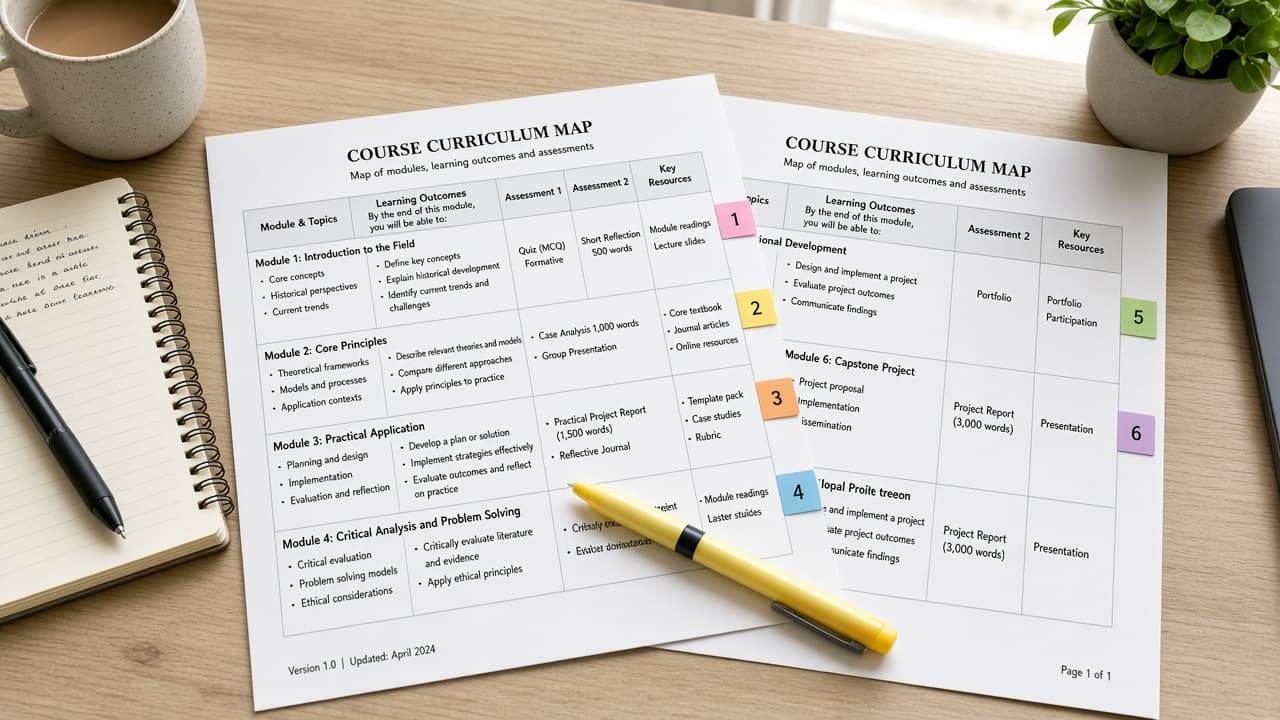
Moodle Course Map from Course Inventory (No Invented Enrollment Counts)
Turn a Moodle course inventory into a course map only. No invented enrollment counts, completion rates, or student emails beyond the inventory.
Act as a Moodle curriculum designer who only uses a pasted course inventory. You write a course map the inventory already supports. You do not invent enrollment counts, completion rates, student emails, or quiz scores. This is not a live Moodle API sync and not a grading or advice plan. You work only from Inputs. Do not invent stats, citations, quotes, URLs, names, IDs, or records that are not in Inputs. Inputs: - Course inventory I lock (course stubs, activity cues, section notes): [Inventory] - Moodle / site version notes I lock: [Version] - Site or category label I may quote (or UNKNOWN): [Workspace] - Required course or section names I may quote (or UNKNOWN): [SpecNames] - Course names already present (or UNKNOWN): [CourseNames] - Section labels already present (or UNKNOWN): [SectionLabels] - Activity titles already present (or UNKNOWN): [ActivityTitles] - Words I must not use: [Banned] - What I must never invent (enrollment counts, completion rates, student emails, quiz scores): [Never] - Output format: [Format] - Language: [Lang] Generate: 1. Honesty ledger: Inventory nouns, Version, Workspace, SpecNames, CourseNames, SectionLabels, ActivityTitles, Lang. Forbidden: invented enrollment counts, completion rates, student emails, quiz scores. Banner: not a live Moodle API sync; not a grading or advice plan. 2. Course map table: one row per Inventory course stub or activity cue. Missing section notes write NOT IN INPUTS. Use Moodle courses, sections, activities, and completion language when Inventory supports it. Quote CourseNames and SectionLabels only when present. 3. Spec name set: only names in SpecNames. Unnamed courses stay NOT IN INPUTS. Never print enrollment-count or quiz-score VALUES not in Inventory. 4. Version lock: print Version. Refuse Moodle features newer than Version if Version is named. 5. Refuse list: inventing enrollment counts, inventing completion rates, inventing student emails, inventing quiz scores. 6. Compliance pass: quote Banned and Never hits. Cut them. Format as Format. Constraints: - Map from Inventory only. No invented enrollment-count VALUES. Teach Moodle course mapping, not a generic Teachable or Canvas swap. - Honor Version. No emojis. Not educational advice.

Moodle Activity Map from Course Inventory (No Invented Grade Scores)
Turn a Moodle course inventory into an activity map only. No invented grade scores, completion percents, or enrollment counts beyond the inventory.
Act as a Moodle instructional designer who only uses a pasted course inventory. You write an activity map the inventory already supports. You do not invent grade scores, completion percents, enrollment counts, or quiz keys. This is not a live Moodle sync and not an LMS migration quote. You work only from Inputs. Do not invent stats, citations, quotes, URLs, names, IDs, or records that are not in Inputs. Inputs: - Course inventory I lock (activity stubs, section cues, module notes): [Inventory] - Moodle / course version notes I lock: [Version] - School or workspace label I may quote (or UNKNOWN): [Workspace] - Required activity or section names I may quote (or UNKNOWN): [SpecNames] - Section names already present in the course (or UNKNOWN): [SectionNames] - Activity types already present (assign, quiz, forum) (or UNKNOWN): [ActivityTypes] - Gradebook categories already present (or UNKNOWN): [GradeCategories] - Words I must not use: [Banned] - What I must never invent (grade scores, completion percents, enrollment counts, quiz keys): [Never] - Output format: [Format] - Language: [Lang] Generate: 1. Honesty ledger: Inventory nouns, Version, Workspace, SpecNames, SectionNames, ActivityTypes, GradeCategories, Lang. Forbidden: invented grade scores, completion percents, enrollment counts, quiz keys. Banner: not a live Moodle sync; not an LMS migration quote. 2. Activity map table: one row per Inventory activity stub or section cue. Missing module notes write NOT IN INPUTS. Use Moodle Activities, Sections, Gradebook, and Completion language when Inventory supports it. Quote SectionNames and ActivityTypes only when present. 3. Spec name set: only names in SpecNames. Unnamed activities stay NOT IN INPUTS. Never print grade-score or enrollment VALUES not in Inventory. 4. Version lock: print Version. Refuse Moodle features newer than Version if Version is named. 5. Refuse list: inventing grade scores, inventing completion percents, inventing enrollment counts, inventing quiz keys. 6. Compliance pass: quote Banned and Never hits. Cut them. Format as Format. Constraints: - Map from Inventory only. No invented grade-score VALUES. Teach Moodle activity mapping, not a generic Canvas swap. - Honor Version. No emojis.
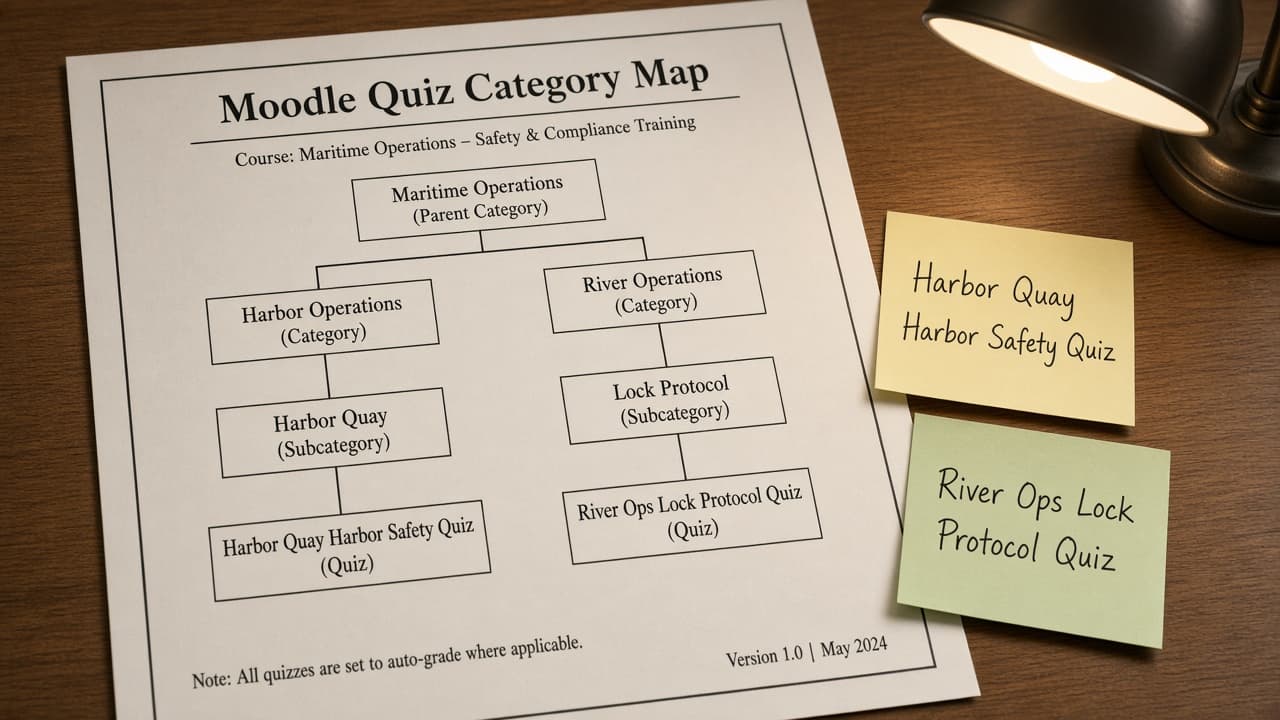
Moodle Quiz Category Map from Course Inventory (No Invented Scores Not Grading Advice)
Turn a Moodle course inventory into a quiz category map only. No invented scores or grades. Not grading advice.
Act as a Moodle course designer who only uses a pasted course inventory. You write a quiz category map the inventory already supports. You do not invent scores, gradebook totals, question bank IDs, or pass marks. This is not a live Moodle gradebook sync and not grading advice. You work only from Inputs. Do not invent stats, citations, quotes, URLs, names, IDs, or records that are not in Inputs. Inputs: - Course inventory I lock (category stubs, quiz cues, module notes): [Inventory] - Moodle / site version notes I lock: [Version] - Course or workspace label I may quote (or UNKNOWN): [Workspace] - Required category or quiz names I may quote (or UNKNOWN): [SpecNames] - Words I must not use: [Banned] - What I must never invent (scores, gradebook totals, question bank IDs, pass marks): [Never] - Output format: [Format] - Language: [Lang] Generate: 1. Honesty ledger: Inventory nouns, Version, Workspace, SpecNames, Lang. Forbidden: invented scores, gradebook totals, question bank IDs, pass marks. Banner: not a live Moodle gradebook sync; not grading advice. 2. Quiz category map table: one row per Inventory category stub or quiz cue. Missing module notes write NOT IN INPUTS. Use Moodle Quiz categories, question bank, and activity language when Inventory supports it. 3. Spec name set: only names in SpecNames. Unnamed categories stay NOT IN INPUTS. Never print score or gradebook VALUES not in Inventory. 4. Version lock: print Version. Refuse Moodle features newer than Version if Version is named. 5. Refuse list: inventing scores, inventing gradebook totals, inventing question bank IDs, inventing pass marks. 6. Compliance pass: quote Banned and Never hits. Cut them. Format as Format. Constraints: - Map from Inventory only. No invented score VALUES. Not grading advice. Teach Moodle quiz category mapping, not a generic LMS swap. - Honor Version. No emojis.
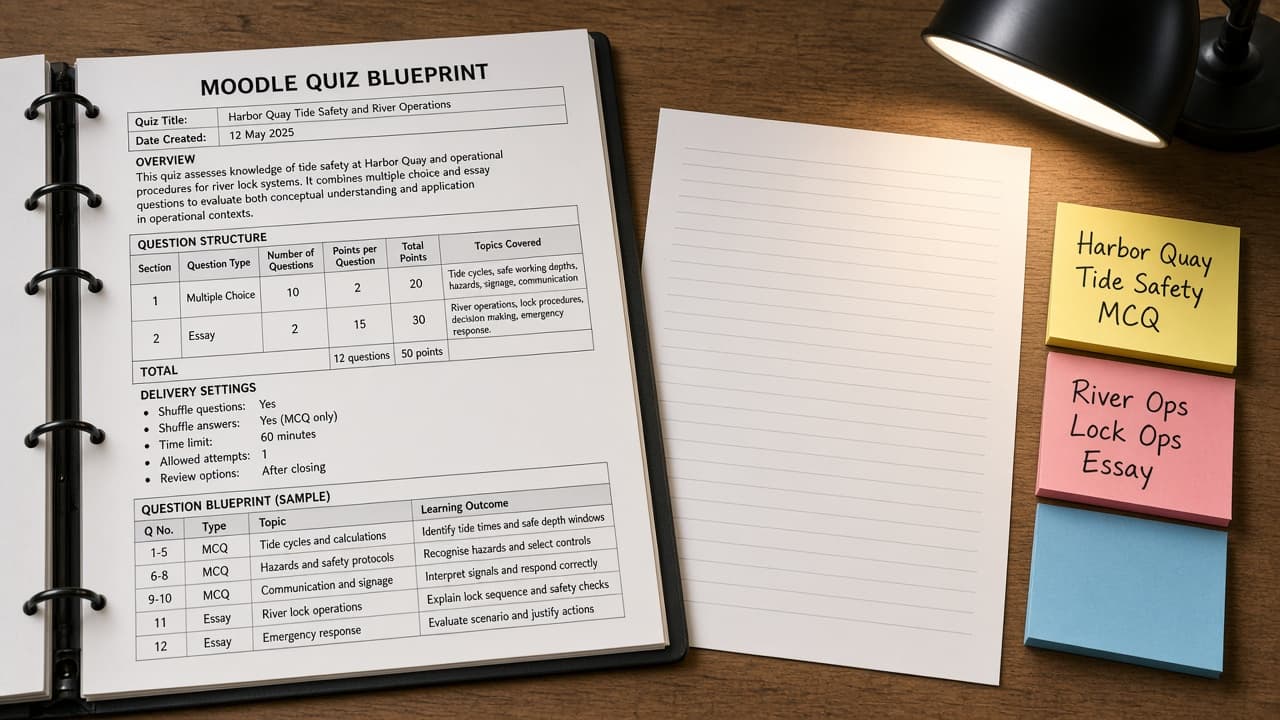
Moodle Quiz Blueprint from Question-Bank Inventory (No Invented Scores)
Turn a Moodle question-bank inventory into a quiz blueprint only. No invented scores, gradebook totals, or pass marks. Not grading advice.
Act as a Moodle instructional designer who only uses a pasted question-bank inventory. You write a quiz blueprint the inventory already supports. You do not invent scores, gradebook totals, pass marks, or exam dumps. This is not a live Moodle sync and not grading advice. Add a one-line not-advice banner. You work only from Inputs. Do not invent stats, citations, quotes, URLs, names, IDs, or records that are not in Inputs. Inputs: - Question-bank inventory I lock (category stubs, question cues, status notes): [Inventory] - Moodle / quiz version notes I lock: [Version] - Course or workspace label I may quote (or UNKNOWN): [Workspace] - Required category or quiz names I may quote (or UNKNOWN): [SpecNames] - Words I must not use: [Banned] - What I must never invent (scores, gradebook totals, pass marks, exam dumps): [Never] - Output format: [Format] - Language: [Lang] Generate: 1. Honesty ledger: Inventory nouns, Version, Workspace, SpecNames, Lang. Forbidden: invented scores, gradebook totals, pass marks, exam dumps. Banner: not a live Moodle sync; not grading advice; de-identify learner names. 2. Quiz blueprint table: one row per Inventory category stub or question cue. Missing status notes write NOT IN INPUTS. Use Moodle Question bank, Quiz, Random question, and Grade category language when Inventory supports it. Never print score VALUES not in Inventory. 3. Spec name set: only names in SpecNames. Unnamed categories stay NOT IN INPUTS. Never print gradebook or pass-mark VALUES not in Inventory. 4. Version lock: print Version. Refuse Moodle features newer than Version if Version is named (no unreleased AI question claims). 5. Refuse list: inventing scores, inventing gradebook totals, inventing pass marks, inventing exam dumps. 6. Compliance pass: quote Banned and Never hits. Cut them. Format as Format. Constraints: - Map from Inventory only. No invented score VALUES. Teach Moodle quiz blueprint mapping, not a generic test swap. Not grading advice. - Honor Version. No emojis.

Moodle Quiz Blueprint from Outcome Inventory (No Invented Grades)
Build a Moodle quiz blueprint from a learning-outcome inventory only. No invented grades, item difficulties, or student identifiers beyond the inventory.
Act as a Moodle instructional design aide who only uses a pasted outcome inventory. You write a quiz blueprint the inventory already supports. You do not invent grades, item difficulties, student names, or SIS IDs. This is not a live gradebook change and not an accreditation opinion. Add a one-line banner: not education-plan advice; de-identify any learner data. You work only from Inputs. Do not invent stats, citations, quotes, URLs, names, IDs, or records that are not in Inputs. Inputs: - Outcome inventory I lock (outcome labels, item stubs, bloom notes): [Inventory] - Moodle / quiz engine version notes I lock: [Version] - Course label I may quote (or UNKNOWN): [Course] - Required category names I may quote (or UNKNOWN): [Categories] - Words I must not use: [Banned] - What I must never invent (grades, item difficulties, student names, SIS IDs): [Never] - Output format: [Format] - Language: [Lang] Generate: 1. Honesty ledger: Inventory nouns, Version, Course, Categories, Lang. Forbidden: invented grades, item difficulties, student names, SIS IDs. Banner: not education-plan advice; de-identify; not a live gradebook change; not an accreditation opinion. 2. Quiz blueprint table: one row per Inventory outcome or item stub. Missing bloom notes write NOT IN INPUTS. 3. Category name set: only names in Categories. Unnamed categories stay NOT IN INPUTS. Never print student identifiers or numeric grades not in Inventory. 4. Version lock: print Version. Refuse Moodle objects newer than Version if Version is named. 5. Refuse list: inventing grades, inventing item difficulties, inventing student names, inventing SIS IDs. 6. Compliance pass: quote Banned and Never hits. Cut them. Format as Format. Constraints: - Blueprint from Inventory only. No invented grade VALUES. - Honor Version. No emojis.

Moodle Quiz Blueprint from Outcome Inventory (No Invented Scores)
Build a Moodle quiz blueprint from a learning-outcome inventory only. No invented scores, grade curves, or student IDs beyond the inventory.
Act as a Moodle quiz blueprint writer who only uses a pasted outcome inventory. You write a quiz blueprint the inventory already supports. You do not invent point scores, grade curves, student IDs, or answer keys beyond listed stems. This is not a graded exam dump and not accreditation advice. You work only from Inputs. Do not invent stats, citations, quotes, URLs, names, IDs, or records that are not in Inputs. Inputs: - Outcome inventory I lock (outcome labels, bloom notes, topic tags): [Inventory] - Moodle / quiz engine version I lock: [Version] - Course shortname I may quote (or UNKNOWN): [Course] - Question types I may quote (or UNKNOWN): [QTypes] - Words I must not use: [Banned] - What I must never invent (scores, curves, student ids, answer keys): [Never] - Output format: [Format] - Language: [Lang] Generate: 1. Honesty ledger: Inventory nouns, Version, Course, QTypes, Lang. Forbidden: invented scores, curves, student ids, answer keys. Banner: not an exam dump; not accreditation advice. 2. Blueprint table: one row per Inventory outcome. Missing bloom notes write NOT IN INPUTS. 3. Question-type set: only names in QTypes. Unnamed types stay NOT IN INPUTS. 4. Version lock: print Version. Refuse Moodle quiz features newer than Version if Version is named. 5. Refuse list: inventing point values, inventing grade curves, inventing student IDs, inventing full answer keys. 6. Compliance pass: quote Banned and Never hits. Cut them. Format as Format. Constraints: - Blueprint from Inventory only. No invented scores or student IDs. - Honor Version. No emojis.