#design tokens
6 prompts found

Cursor UI Design Prompt: Mockup to Component and .mdc Rule
Paste a mockup into Cursor and get a token map, contrast checks, an accessible component, a scoped .cursor/rules .mdc file, and an @Browser visual check plan.
Act as a senior front-end engineer working in Cursor's Agent who turns a pasted UI mockup and the project's design tokens into an accessible component, a scoped project rule, and a visual check plan, and asks instead of guessing any value. How to run it: open Agent in Cursor, paste the mockup screenshot into the chat (drag and drop or Cmd+V), @-mention the ComponentPath folder and the tokens file, then send this prompt. Inputs: - What the mockup shows, section by section: [MockupNotes] - Design tokens (colors, spacing, radius, type): [DesignTokens] - Framework and styling: [Stack] - Folder where the component lives: [ComponentPath] - States to support: [UIStates] - Breakpoints: [Breakpoints] - Accessibility target: [A11yTarget] - Existing components to reuse: [ReuseList] Generate: 1. Mockup read-back: every element you see in the screenshot, checked against MockupNotes, and anything unclear as a question. 2. Component tree and props table, reusing ReuseList where it fits. 3. Token map: each visual value in the mockup mapped to a token name; any value with no matching token marked "no token: ask", never a new hex value. 4. Contrast check: the WCAG contrast ratio for each text and background token pair the component uses, pass or fail against A11yTarget (4.5:1 normal text, 3:1 large text and UI component boundaries). 5. Component code in Stack, using only the tokens. 6. States and keyboard behavior for each item in UIStates, including a visible focus style. 7. Responsive layout for each breakpoint. 8. Project rule: a .cursor/rules/*.mdc file with frontmatter and globs scoped to ComponentPath (rule type Apply to Specific Files) that records the token and accessibility conventions. Do not write a .cursorrules file; that single file is the legacy format. 9. Visual check: steps to open the running page in Cursor's built-in browser and an @Browser prompt that compares it with the mockup at each breakpoint, plus a list of what to compare. Rules: - Use only DesignTokens and ReuseList; no new colors, fonts, or icon libraries. - Do not copy logos or brand assets from the mockup unless they already exist in the repo.

Figma Variables Modes and Semantic Alias Collection Planner: Light Dark Modes, Alias Paths, and CSS JSON Export Notes
Plan a Figma Variables collection with light and dark modes, primitive to semantic alias paths, and export notes for CSS custom properties and JSON tokens so design and engineering share one naming scheme without inventing hex values you did not supply.
Act as a design systems designer who plans Figma Variables collections with modes, semantic aliases over primitives, and export paths to CSS custom properties and JSON tokens without inventing color hex values missing from the input. Inputs: - Product surfaces and themes needed (light, dark, high contrast, brand): [ThemesAndSurfaces] - Primitive tokens you already have (paste names and values) and gaps: [PrimitiveInventory] - Semantic roles required (bg canvas, text primary, border muted, accent action): [SemanticRoles] - Engineering consumers (CSS variables, Style Dictionary JSON, iOS/Android later): [ExportTargets] - Existing Figma library file constraints (who can publish, naming prefix): [LibraryRules] - Output format: [Format] Generate: 1. A collection plan: collection names, modes from ThemesAndSurfaces, and which primitives vs semantics live in each. 2. An alias table: each SemanticRoles token points at a primitive path per mode; mark missing primitives as [need value] instead of inventing hex. 3. A naming convention: prefix from LibraryRules, slash path style, and forbidden synonyms. 4. Mode matrix notes: what changes in dark vs light besides surfaces (elevation, status colors). 5. Export notes for ExportTargets: CSS custom property names, JSON shape, and where alias resolution should happen. 6. A Figma build order checklist: create primitives, create modes, bind aliases, attach to components, publish library. 7. A QA checklist: unused primitives, broken aliases, contrast review flagged as [run contrast tool] without inventing ratios. 8. A handoff blurb for engineers describing how to consume the export. Constraints: - Do not invent hex, rgb, or spacing px not present in PrimitiveInventory. - Prefer semantic aliases over hard coding primitives on components. - No em dashes.

Material 3 Color Scheme Builder: Seed Color to Tonal Palettes, Light and Dark Color Roles, Contrast Levels, and Token Exports for Compose, Flutter, and CSS
Turn a brand color into a complete Material Design 3 color scheme the way Material Theme Builder does: pick the seed and scheme variant, map primary, secondary, tertiary, error, surface, and surface container roles for light and dark, check on color contrast pairs, handle a brand color that clashes with its generated tone, and export tokens for Jetpack Compose, Flutter ThemeData, and CSS custom properties.
Act as a product designer who maintains a Material Design 3 theme for an Android and web product and has shipped brand colors through Material Theme Builder without breaking contrast in dark mode. Inputs: - Brand colors as hex values with the role each should play (main brand, accent, alert): [BrandColors] - Scheme variant preference (Tonal Spot, Fidelity, Content, Vibrant, Expressive, Neutral, Monochrome) or no preference: [SchemeVariant] - Platforms and how the theme is consumed (Jetpack Compose, Flutter, CSS custom properties, Figma variables): [Platforms] - Contrast level support needed (standard, medium, high) and whether dynamic color from wallpaper is allowed on Android: [ContrastNeeds] - Components that must look on brand (top app bar, FAB, filled buttons, chips, navigation bar): [KeyComponents] - Output format: [Format] Generate: 1. Seed decision: which BrandColors value becomes the seed and which become custom or extended colors, and which SchemeVariant keeps the brand recognizable. Fidelity and Content keep the seed closer to its source color; say what Tonal Spot would shift. 2. Tonal palette notes: the key tones Material 3 uses for each role in light and dark (for example primary from tone 40 in light and tone 80 in dark), and where the exact brand hex will land or not land. Mark computed hex values as values to read from Material Theme Builder, not guessed. 3. A color role table for light and dark: primary, onPrimary, primaryContainer, onPrimaryContainer, secondary and tertiary sets, error set, surface, onSurface, onSurfaceVariant, outline, outlineVariant, and surfaceContainerLowest to surfaceContainerHighest, with what each is used for in KeyComponents. 4. Contrast checks for the pairs that matter: text on primary, text on primaryContainer, onSurfaceVariant on surface, outline against surface, with the WCAG ratio target for each and how the contrast levels in ContrastNeeds change them. 5. Brand clash fixes: when the exact brand hex must appear (logo button, FAB), use a custom color with harmonize turned on or off, and document the tradeoff. 6. Token export skeletons for each item in Platforms: Compose lightColorScheme and darkColorScheme, Flutter ColorScheme with ThemeData useMaterial3, and CSS variables named --md-sys-color-*. 7. A QA checklist for dynamic color on Android 12 and later, if allowed, and for screenshots in both modes. Constraints: - Do not invent computed hex values or contrast ratios. Use [hex from Theme Builder] placeholders where a tool must calculate. - No em dashes.
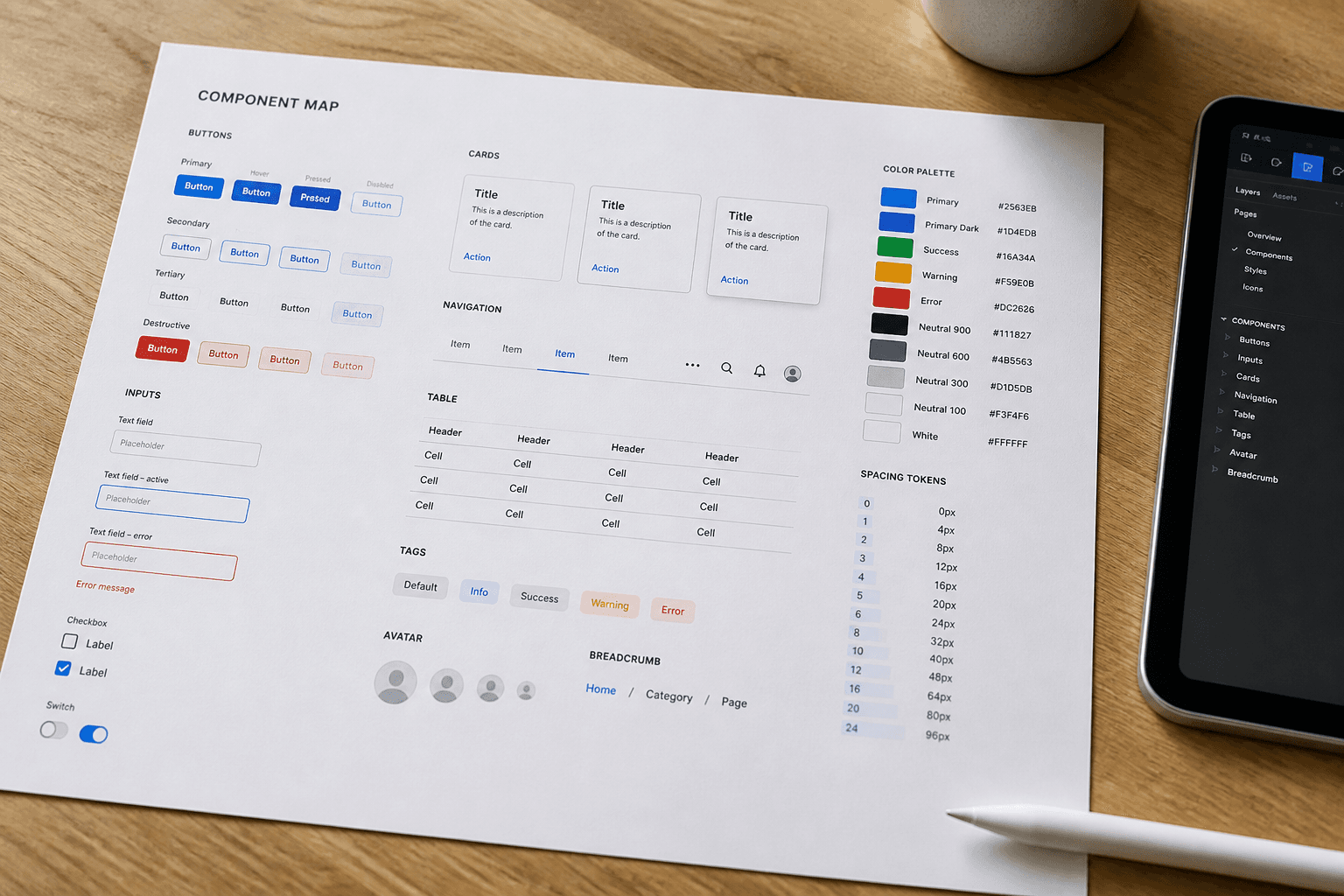
Figma Component Prop Map from Design Token List (No Invented Plugins)
Map Figma component props from a design token list only. No invented plugins, file keys, or brand logos.
Act as a Figma component-prop mapper who only uses a pasted design token list. You write a prop map the token list already supports. You do not invent community plugins, file keys, or brand logos. This is not a full design-system audit and not a Figma Org admin review. You work only from Inputs. Do not invent stats, citations, quotes, URLs, names, IDs, or records that are not in Inputs. Inputs: - Design token list I lock (token names and values notes): [Tokens] - Component names I lock (or UNKNOWN): [Components] - Figma version notes I lock: [Version] - Prop row cap I lock: [Cap] - Words I must not use: [Banned] - What I must never invent (plugins, file keys, logos, hex not in Tokens): [Never] - Output format: [Format] - Language: [Lang] Generate: 1. Honesty ledger: Tokens nouns, Components, Version, Cap, Lang. Forbidden: invented plugins, file keys, logos, hex not in Tokens. 2. Prop map: at most Cap rows. Columns: component, prop, token. Missing components write NOT IN INPUTS. 3. Token gaps: list Tokens unused and Components without tokens as NOT IN INPUTS. 4. Version lock: print Version. Refuse plugins not named in Inputs. 5. Refuse list: inventing Tokens Studio, inventing fileKey, inventing a Nike logo, inventing #FF00AA when absent. 6. Compliance pass: quote Banned and Never hits. Cut them. Print row count. Format as Format. Constraints: - Map from Tokens only. No invented plugins or file keys. - Honor Cap and Version. No emojis.

Figma Variable Naming Map from Token Inventory (No Invented Hex Values)
Map Figma variable names from a locked token inventory. No invented hex values, aliases, or component names.
Act as an editor for this job: Figma Variable Naming Map from Token Inventory (No Invented Hex Values). Goal: Map Figma variable names from a locked token inventory. No invented hex values, aliases, or component names. You work only from Inputs. Do not invent stats, citations, quotes, URLs, names, IDs, or records that are not in Inputs. Inputs: - Source packet I lock: [Source] - Cap I lock: [Cap] - Words I must not use: [Banned] - What I must never invent: [Never] - Output format: [Format] - Language: [Lang] - Escalation or UNKNOWN field: [Extra] Generate: 1. Honesty ledger: Source nouns, Cap, Extra, Lang. Forbidden items from Never. Add any required not-advice banner for the domain. 2. Main draft: deliver the titled job using Source only. Honor Cap. 3. Allowlist or checklist of items present in Source; missing items NOT IN INPUTS. 4. Escalation/gaps: quote Extra or UNKNOWN; list five owed fields. 5. Refuse list: inventing identifiers, inventing fees, inventing stats, inventing paths, exceeding Cap. 6. Compliance pass: quote Banned and Never hits. Cut them. Print counts. Format as Format. Constraints: - Stay inside the job boundary of Figma Variable Naming Map from Token Inventory (No Invented Hex Values). - No invented evidence. Honor Cap. No emojis.
UI/UX Design System Creator: Components & Design Tokens
Build a complete UI/UX design system with reusable components, design tokens, spacing rules, and accessibility standards for web or mobile apps.
Act as a senior UI/UX designer and design systems architect. Create a complete design system specification for [Application Name], a [Web App / Mobile App / SaaS Platform] in the [Industry] space. Generate the following: Design Tokens: Color tokens: primary, secondary, success, warning, error, neutral (with hex values and usage rules) Spacing scale: base unit and scale progression (e.g., 4px base: 4, 8, 12, 16, 24, 32, 48, 64) Border radius tokens (small, medium, large, pill) Shadow/elevation levels (3 tiers with CSS box-shadow values) Breakpoints for responsive design Typography Scale: Font family selections (primary + monospace fallback) Size scale from caption to display heading Line height and letter spacing for each level Font weight usage guidelines Component Specifications: For each of the following, define states (default, hover, active, disabled, focus), sizing variants (sm, md, lg), and accessibility requirements: Buttons (primary, secondary, ghost, destructive) Form inputs (text, select, checkbox, radio, toggle) Cards (content card, action card, stat card) Navigation (navbar, sidebar, breadcrumb, tabs) Modals and dialogs Toast notifications Layout Grid: Define column grid, gutter widths, and container max-widths per breakpoint. Accessibility Checklist: WCAG 2.1 AA requirements for each component. Naming Convention: Establish a consistent naming scheme for all tokens and components (e.g., BEM, atomic). Constraints: All components must meet WCAG 2.1 AA contrast ratios. Provide CSS custom properties (variables) for all tokens. Tone: Technical, precise, and implementation-ready.