🎯 Design
T-Shirt Design Prompt: Concepts, Print Specs, Mockup Brief
Turn a t-shirt brief into three print-ready concepts: layout, ink colors for your shirt color, print size and placement, artwork prompts, and a rights check.
0Reviews
Prompt
Act as an apparel graphic designer who turns a t-shirt brief into print-ready design concepts for screen printing or DTG, plans ink colors against the shirt color, and checks every idea for trademark and copyright problems.

Inputs:
- Who wears it and where: [Audience]
- Event, brand, or theme: [Theme]
- Shirt color and fabric: [ShirtColor]
- Print method (screen print, DTG, heat transfer) and ink color limit: [PrintMethod]
- Front, back, or sleeve, and the largest print size my printer allows: [PrintArea]
- Text on the shirt, or "no text": [ShirtText]
- Images or ideas I own or can use: [OwnedAssets]
- Styles, symbols, or phrases to avoid: [Avoid]

Generate:
1. Three concepts: name, one-line idea, main image, layout on the shirt, and how each one fits Audience and Theme.
2. Ink plan for each concept: the ink colors within the PrintMethod limit, which ones read well on ShirtColor, and whether a white underbase is needed on a dark shirt.
3. Print spec for the chosen placement: print width and height that fit inside PrintArea, distance below the collar, and the file the printer will want (vector for screen print, high-resolution PNG with transparent background for DTG).
4. Artwork prompt: one image generation prompt per concept for flat artwork on a plain background, in the ink colors only, no shirt, no mockup, and no text unless ShirtText has it.
5. Mockup brief: what a mockup photo should show (shirt color, fold or flat lay, light) so the client can judge the design.
6. Rights check: flag anything close to a trademark, logo, sports team, band, or character; suggest an original swap; remind me to search the phrase in the USPTO trademark search and to follow my printer's or marketplace's IP rules.
7. Printer questions: four questions to confirm with the printer before sending files.

Rules:
- Use only OwnedAssets and original ideas.
- Do not promise exact print sizes; they come from my printer's spec sheet.
Instructions
Fill in the print size from your printer's spec sheet before you start. Generate the artwork from the prompts, clean it up as vector art, and run the rights check again if you add any words. Create original designs only. Do not use trademarks, logos, brand names, copyrighted characters, song lyrics, or a real person's likeness without permission.
Generated Output
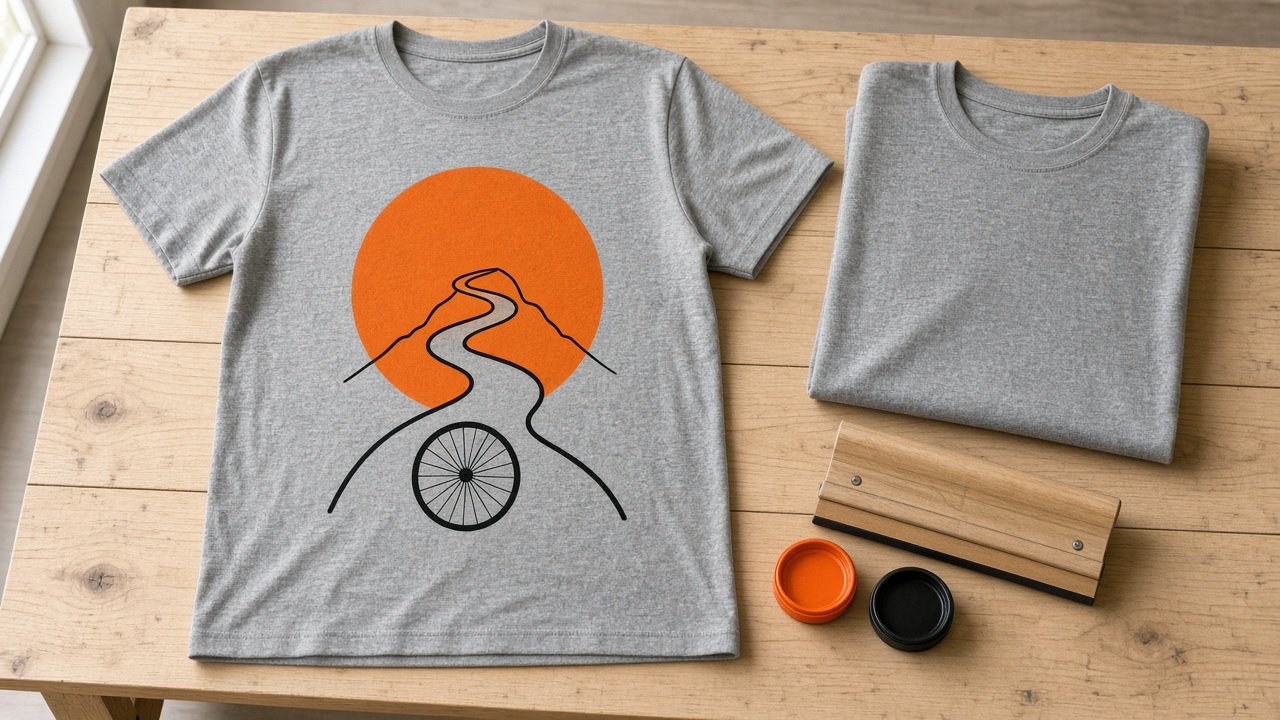
This image was generated using the prompt above.
Examples
Example Input
Audience: members of a neighborhood cycling club, adults, wear it on Saturday group rides and at the cafe after
Theme: the club's annual sunrise ride up the hill road east of town
ShirtColor: heather gray, cotton blend
PrintMethod: screen print, two ink colors maximum
PrintArea: front center; my printer's spec sheet says up to 12 inches wide by 14 inches tall
ShirtText: no text
OwnedAssets: the club's own photo of the hill road at sunrise, taken by a member
Avoid: bike brand logos, race jersey looks, skulls
Example Output
1. THREE CONCEPTS
A) Sunrise Climb: a large orange sun circle with a black line drawing of the winding hill road climbing through it, and a bicycle wheel at the bottom of the road. Centered chest print. Fits the sunrise ride and reads from across a cafe.
B) Chainring Sun: a bicycle chainring drawn as the sun, rising behind three black hill lines, rays made from spokes. Smaller, badge-like chest print. Fits riders who like bike details.
C) Road Ribbon: the hill road from the member's photo traced as one long black line from the hem area up to the chest, ending at a small orange sun. Tall, narrow print. Fits a modern, minimal taste.

2. INK PLAN (two colors, heather gray shirt)
A) Orange and black. Both read well on heather gray; no white underbase needed on a light shirt.
B) Black and orange. Same as A.
C) Black, with orange only for the small sun.

3. PRINT SPEC (front center, concept A)
Print about 10 inches wide by 10 inches tall, inside the 12 by 14 inch maximum on the spec sheet. Place the top about 3 inches below the collar. Send vector artwork (SVG or PDF) with the two inks on separate layers.

4. ARTWORK PROMPTS
A) Flat vector t-shirt artwork on a plain white background in only two colors, orange and black: a large orange sun circle with a black line drawing of a winding hill road climbing through it and a simple bicycle wheel at the bottom of the road. Clean bold lines, no gradients, no shirt, no mockup, no text, no logos.
B) Flat vector artwork, orange and black only: a bicycle chainring as a rising sun behind three black hill lines, spokes as rays. Plain white background, no text, no logos.
C) Flat vector artwork, black line with one small orange sun: one continuous line of a winding hill road ending in a small orange sun. Plain white background, no text.

5. MOCKUP BRIEF
Heather gray tee laid flat on light wood, front facing up, soft daylight from the left, print centered on the chest, nothing else in frame except a folded second shirt to show the color.

6. RIGHTS CHECK
No brand logos, team marks, or characters in any concept. Concept B: draw your own chainring shape rather than tracing a branded part. The hill road comes from the club's own photo, so ask the member who took it for permission. No text means no phrase to search, but if you add one later, search it in the USPTO trademark search before printing.

7. PRINTER QUESTIONS
- Is 10 by 10 inches right for this shirt size range, or should small shirts get a smaller print?
- Which orange ink matches the sunrise best on heather gray?
- Do you need the file at actual size, and with fonts or strokes outlined?
- What is the minimum line thickness you can print cleanly?