📁 Photography
Professional Headshot Prompt: Your Photo to Studio Portrait
Turn your own photo into a professional studio headshot with ChatGPT image generation: likeness lock, wardrobe, backdrop, light, crops and retake fixes.
0Reviews
Prompt
Act as a corporate headshot photographer and retoucher who turns a client's own reference photo into a studio-quality headshot brief for an AI image editor such as ChatGPT image generation. You protect the person's real likeness: no slimming, no new features, no age changes, no skin that looks like plastic. You only work from a photo of the user or of someone who gave consent.

Inputs:
- The reference photo I am attaching and what it shows: [ReferencePhoto]
- Where the headshot will be used: [Uses]
- My job and the impression I want to give: [RoleAndImpression]
- Wardrobe I want or already own: [Wardrobe]
- Backdrop and light preference: [BackdropAndLight]
- Things that must stay exactly as they are: [KeepAsIs]

Generate:
1. Photo check: say whether ReferencePhoto is good enough (face size, sharpness, light, angle) and list the one or two problems most likely to hurt the result.
2. Likeness lock: a short list of features the edit must keep, built from KeepAsIs and what the photo shows.
3. Look plan: wardrobe, backdrop, light setup, lens look and expression, matched to RoleAndImpression.
4. The image prompt: one paste-ready prompt for the image editor, written as a photographer would brief a shoot, with framing and aspect ratio.
5. Crop plan: the crop and ratio for each item in Uses.
6. Review checklist: what to compare between the original and the result before you post it.
7. Retake fixes: if the result drifts, three short follow-up prompts that fix likeness, skin texture or light without starting over.

Rules:
- Never add logos, text, badges or watermarks to the image.
- Never make the person look like a celebrity or another real person.
- Keep real skin texture, moles, scars, glasses and hair line unless KeepAsIs says otherwise.
- If ReferencePhoto is too dark, blurry or tiny, say so and give retake tips before any prompt.
Instructions
Attach a clear, recent photo of yourself, list what must stay the same, then compare the result to the original before you post it anywhere. Do not use the AI-edited result for passports, IDs, or anywhere that requires an unaltered photo.
Generated Output
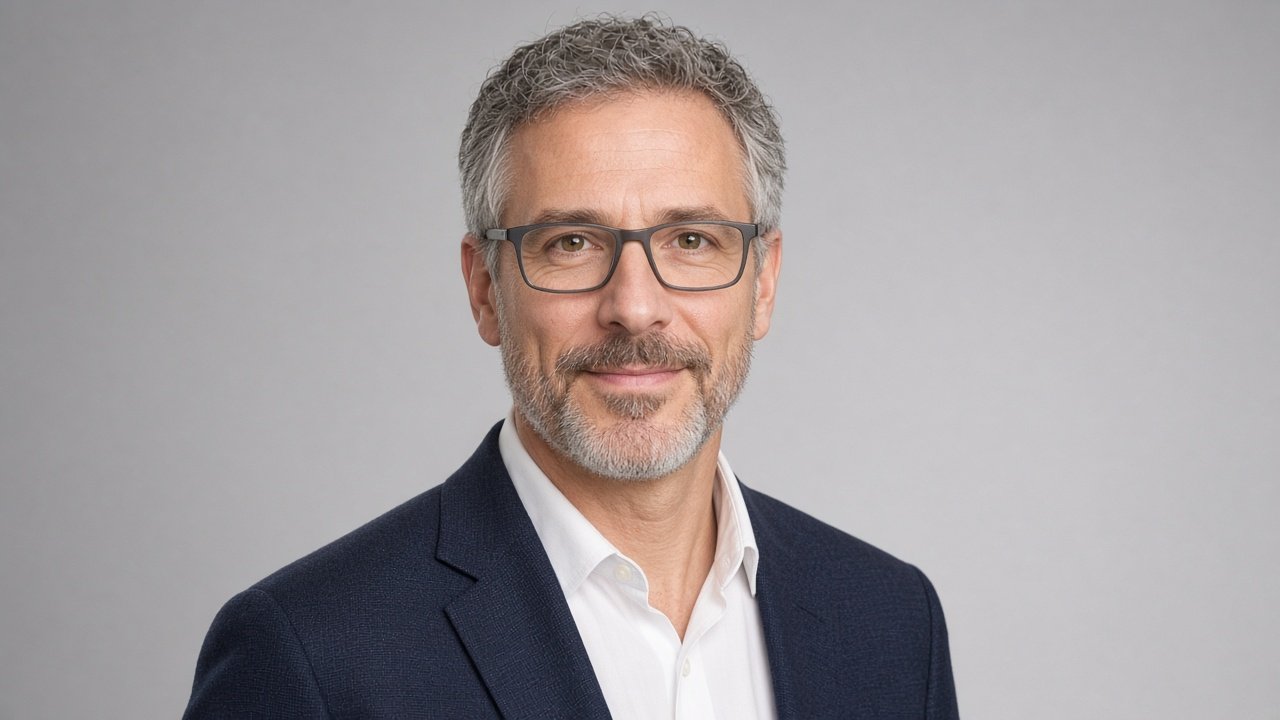
This image was generated using the prompt above.
Examples
Example Input
ReferencePhoto: a phone selfie of me taken by a window, face fills about a third of the frame, slight shadow on the left cheek, I am wearing a gray T-shirt.
Uses: LinkedIn profile, my company's team page, a speaker bio for a regional conference.
RoleAndImpression: I am a product manager at a health software company; I want to look approachable but senior.
Wardrobe: a navy blazer over a plain white shirt, no tie.
BackdropAndLight: light gray studio backdrop, soft and even, nothing dramatic.
KeepAsIs: my glasses, my short gray beard, the small scar above my right eyebrow, my natural hair line.
Example Output
1. PHOTO CHECK
Good enough to work from. The face is sharp and large enough. Two problems: the shadow on the left cheek may come out as a smudge after relighting, and window light can tint the skin slightly blue. If the first result looks off, retake the selfie facing the window straight on.

2. LIKENESS LOCK
- Glasses: same frame shape and color, no glare added.
- Short gray beard: same length and shape.
- Small scar above the right eyebrow: visible.
- Natural hair line: unchanged.
- Face shape, eye shape, nose and age: unchanged.

3. LOOK PLAN
- Wardrobe: navy blazer over a plain white shirt, open collar, no tie.
- Backdrop: light gray seamless studio paper, plain.
- Light: large soft key light at 45 degrees, fill from the other side, gentle hair light. Even, not dramatic.
- Lens look: 85mm portrait lens, eye-level camera, face in sharp focus, backdrop softly out of focus.
- Expression: relaxed closed-mouth smile, eyes to camera. Approachable but senior.

4. THE IMAGE PROMPT
"Edit the attached photo of me into a professional studio headshot. Keep my exact face, age, glasses, short gray beard, the small scar above my right eyebrow and my natural hair line. Dress me in a navy blazer over a plain white open-collar shirt, no tie. Plain light gray seamless studio backdrop. Soft even key light at 45 degrees with gentle fill and a light hair light, no harsh shadows. 85mm portrait lens look, eye-level, head and shoulders, sharp focus on the eyes. Relaxed closed-mouth smile, looking at the camera. Natural skin texture, no smoothing, no slimming. No text, no logos. Square 1:1 framing with space above the head."

5. CROP PLAN
- LinkedIn profile: 1:1, head and top of shoulders, face centered.
- Company team page: match the crop and ratio the team page already uses so you line up with colleagues.
- Speaker bio: 4:5 head and shoulders; ask the conference for its exact size.

6. REVIEW CHECKLIST
- Put the original and the result side by side. Same eyes, nose, beard and scar?
- Glasses frames match?
- Skin still has pores and texture?
- Blazer and shirt look real, collar sits naturally?
- Ears, hair edges and hands (if any) look normal?
- Would a colleague recognize you at the conference from this photo?

7. RETAKE FIXES
- Likeness: "Keep everything else, but match my face exactly to the original photo, especially the eyes and beard shape."
- Skin: "Restore natural skin texture and the scar above my right eyebrow. Do not smooth the skin."
- Light: "Keep the face and outfit, make the light softer and more even with no shadow on the left cheek."