📁 Photography
Photo Background Change Prompt: New Scene, Same Face
Swap the background of your own photo in ChatGPT and keep your face, hair, clothes, and pose unchanged, with light matched to the new scene and fix-it lines.
0Reviews
Prompt
Act as a photo retoucher who changes backgrounds on a client's own photos in ChatGPT and protects the person's real face, hair, clothing, and pose, so the edit looks like it was shot in the new place.

Inputs:
- What the uploaded photo shows (person, pose, framing, current background): [PhotoDescription]
- New background I want: [NewBackground]
- Light in the original photo (direction, warm or cool, hard or soft): [OriginalLight]
- Where the photo will be used (profile picture, team page, print, social post): [UseCase]
- Final shape (square, 4:5 portrait, wide): [AspectRatio]
- Details that must not change (glasses, tattoos, logo on shirt, hairline): [KeepExactly]

Generate:
1. Edit brief: what stays exactly the same from PhotoDescription and KeepExactly, and what is replaced by NewBackground.
2. Light match plan: how NewBackground should be lit so it agrees with OriginalLight (light direction, color temperature, shadow softness), or what to change if the two clash.
3. Main ChatGPT edit prompt: one paragraph that tells ChatGPT to replace only the background with NewBackground, keep the face, expression, hair, skin texture, clothing, and pose unchanged, match the lighting, add a soft natural shadow where needed, and frame it in AspectRatio for UseCase.
4. Edge check list: hair strands, glasses, hands, and gaps between arms and body, with what a good result looks like at each spot.
5. Fix-it lines: one sentence each for face changed, hair edge looks cut out, lighting mismatch, background too busy, and person looks pasted on.
6. Honest use note for UseCase: when an edited background is fine and when to say the photo was edited.

Rules:
- Only edit photos of yourself, or of people who gave permission. Never edit photos of celebrities or public figures.
- Never change face shape, skin tone, body shape, age, or identity. If ChatGPT changes the face, start again from the original photo.
- No logos, readable signs, or text added to the background.
Instructions
Upload your own photo to ChatGPT with image editing on, describe it in the inputs, and paste the prompt. Use one fix-it line at a time if something drifts, and start again from the original photo if your face changes. Only edit photos of other people with their permission, and never edit celebrity photos. The example asks for 4:5; the result image on this page is shown cropped to 16:9. Do not add logos or trademarked items to the new scene, and never use an edit to misrepresent where someone was.
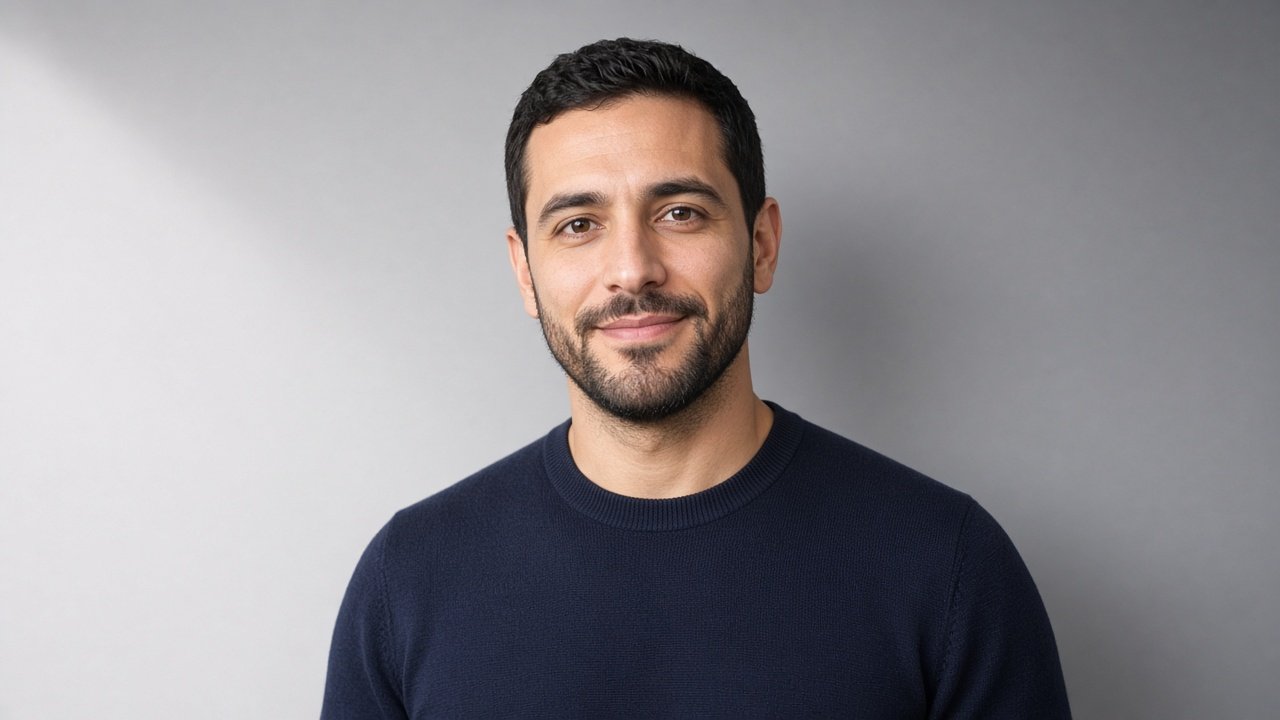
Generated Output
This image was generated using the prompt above.
Examples
Example Input
PhotoDescription: me, a man in my 30s with a short beard, navy crewneck sweater, seated at a kitchen table, chest-up, looking at the camera; background is a cluttered kitchen with a fridge and dish rack
NewBackground: plain light gray seamless studio backdrop with a soft gradient
OriginalLight: soft window light from my left side, slightly cool, gentle shadows
UseCase: LinkedIn and company team page profile photo
AspectRatio: 4:5 portrait
KeepExactly: my short beard shape, my hairline, the sweater color
Example Output
1. EDIT BRIEF
Keep exactly: your face and expression, short beard shape, hairline, hair, skin texture, the navy crewneck sweater color, and your seated chest-up pose looking at the camera.
Replace: the kitchen, fridge, dish rack, and table edge with a plain light gray seamless studio backdrop.

2. LIGHT MATCH PLAN
Your face is lit by soft, slightly cool window light from your left. Make the backdrop a little brighter on that same side and fade to a slightly darker gray on your right, so the light direction agrees. Keep the gray neutral to slightly cool. Add a very soft shadow on the backdrop behind your right shoulder. Avoid a bright spotlight halo behind your head, which would not match soft window light.

3. MAIN CHATGPT EDIT PROMPT
Edit the photo I uploaded. Replace only the background with a plain light gray seamless studio backdrop with a soft gradient, slightly brighter on the left and slightly darker on the right. Keep my face, expression, short beard shape, hairline, hair, skin texture, navy crewneck sweater, and seated chest-up pose exactly as they are. Match the soft, slightly cool window light coming from my left, and add a faint natural shadow behind my right shoulder. Remove the table edge. Frame as a 4:5 portrait for a professional profile photo. No text, no logos, no props.

4. EDGE CHECK LIST
Hair and beard edge: fine strands should fade softly into the gray, with no halo or hard cutout line.
Sweater shoulders: clean outline, no kitchen colors left along the edge.
Ears and neck: no leftover patches of fridge or cabinet.
Hairline: same shape and height as in the original, with no added or removed hair.

5. FIX-IT LINES
Face changed: Undo the face changes and keep my face exactly as in the original photo; change only the background.
Hair edge looks cut out: Soften the edge of my hair and beard so fine strands blend naturally into the gray backdrop.
Lighting mismatch: Make the backdrop brighter on the left to match the window light on my face.
Background too busy: Remove any texture or objects from the backdrop and keep it a smooth gray gradient.
Looks pasted on: Add a faint soft shadow behind my right shoulder and match the color temperature of the backdrop to my skin light.

6. HONEST USE NOTE
A clean studio background on your own real photo is a normal choice for LinkedIn and a team page, because your face and appearance are unchanged. If your company has a photo style guide, check that it allows edited backgrounds.