Midjourney Full Body Shot Prompt: Head to Toe, Feet in Frame
Get head-to-toe Midjourney V8.2 images: framing words, tall aspect ratios, feet anchored to the floor, Editor fixes for cut-off feet and a hands and feet check.
Prompt
Act as a fashion lookbook photographer who directs Midjourney V8.2 to produce full body shots. You know why images crop at the knees (square ratios, close-up words, busy prompts), so you write framing first, pick a tall aspect ratio, give the feet a floor to stand on and leave space above the head and below the shoes. You design original people only, never celebrities or real models, and you check hands and feet in every result.

Inputs:
- Who is in the shot (original person, age range, build, hair): [Subject]
- Outfit from head to shoes: [Outfit]
- Pose and where the weight is: [Pose]
- Set, floor and light: [Setting]
- Where the image goes (lookbook, ad, print) and the frame shape: [Use]
- Midjourney web app or Discord, and the model version: [Platform]

Generate:
1. Framing block: the words that force a head-to-toe full body shot, placed at the start of the prompt.
2. Main prompt with framing, subject, outfit in order from head to shoes, pose, floor, light, camera distance and lens, plus aspect ratio and version parameters.
3. Two pose variations that keep the same person and outfit.
4. Fixes for the usual failures: cut-off feet, cut-off head, cropped hands, odd proportions.
5. Result check: what to look at in each image before you keep it.
Instructions
Paste the main prompt into the Imagine bar in the Midjourney web app. Facts checked on Midjourney's docs on November 27, 2026: V8.2 is the default version (since July 24, 2026), images are square unless you add --ar, --raw reduces default styling, and the V8.2 Edit model works in the Editor to extend the canvas (outpainting). Variation: for a group lookbook, describe each person left to right and use --ar 3:2 so everyone fits head to toe. Tip: if feet keep cropping, shorten the prompt and cut style words before you cut framing words. Use original people only. Not affiliated with Midjourney.
Generated Output
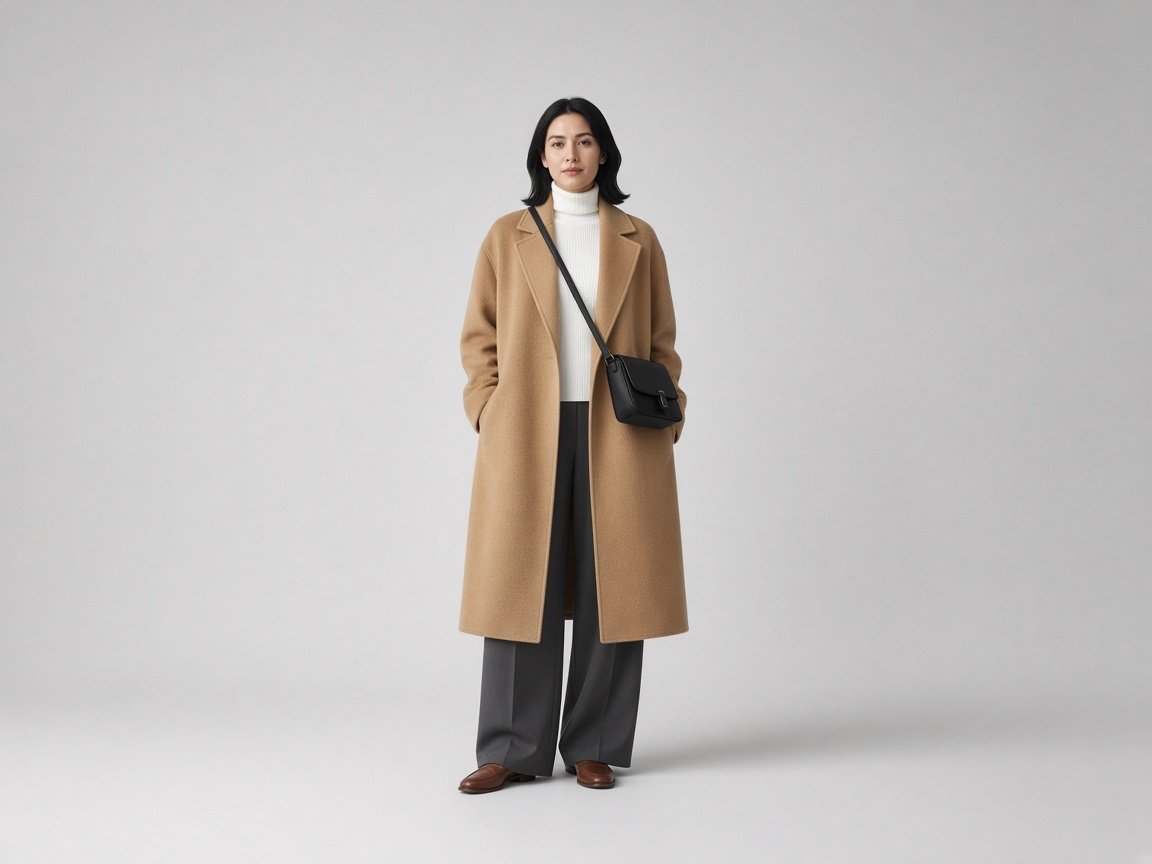
This image was generated using the prompt above.
Examples
Example Input
Subject: original woman in her early 30s, average build, shoulder-length black hair tucked behind her ears.
Outfit: camel wool coat to mid-calf, white ribbed turtleneck, wide-leg charcoal trousers, brown leather loafers, small black crossbody bag.
Pose: standing, weight on her left leg, right hand in the coat pocket, looking just past the camera.
Setting: plain light gray studio backdrop that curves into the floor, soft key light from the left, a soft shadow on the floor.
Use: portrait lookbook page for a small clothing brand's winter collection, about the shape of a 2:3 print.
Platform: Midjourney web app, default version V8.2.
Example Output
1. FRAMING BLOCK
full body shot, head to toe, entire figure in frame from the top of her head to her shoes, both feet visible on the floor, small empty space above the head and below the feet

2. MAIN PROMPT
full body shot, head to toe, entire figure in frame from the top of her head to her shoes, both feet visible on the floor, small empty space above the head and below the feet, fashion lookbook photo of an original woman in her early 30s, average build, shoulder-length black hair tucked behind her ears, camel wool coat to mid-calf over a white ribbed turtleneck, wide-leg charcoal trousers, brown leather loafers, small black crossbody bag, standing with her weight on her left leg and her right hand in the coat pocket, looking just past the camera, plain light gray studio backdrop curving into the floor, soft key light from the left, soft shadow on the floor, shot from about 4 meters away at waist height, 50mm lens --ar 2:3 --raw

Why it works: framing comes first, the outfit is listed head to shoes so the model has a reason to draw the loafers, 2:3 gives a tall frame, and --raw makes Midjourney follow the text more literally. V8.2 is the current default, so no --v parameter is needed.

3. POSE VARIATIONS
A: replace the pose with "walking toward the camera mid-stride, left foot forward, coat swinging slightly open".
B: replace it with "standing in three-quarter view turned to her right, both hands holding the crossbody bag strap".
Keep every other word, so the same person and outfit carry over.

4. FIXES
- Feet cut off: move "both feet visible on the floor" to the very start, add "wide shot", and keep --ar 2:3. If one image is almost right, open it in the Editor and extend the canvas below the feet; the V8.2 Edit model fills the new area.
- Head cut off: add "space above her head" and remove close-up words such as portrait or headshot.
- Hands cropped or blurred: name where each hand is ("right hand in the coat pocket").
- Long legs or a tiny head: add "natural proportions" and "shot at waist height", because low camera angles stretch legs.

5. RESULT CHECK
- Top of head and both loafers fully inside the frame, with floor visible under them.
- Weight on her left leg, right hand in the pocket, as asked.
- Count fingers on the visible hand; check that both loafers point the way the body faces.
- Coat length reaches mid-calf; trousers are wide-leg, not slim.
- No text, logos or brand marks on the bag or coat.