Jewelry Design Prompt: Concept to Photoreal Render and Spec
Enter the piece, metal, stone, motif and size: get a design brief, a spec sheet with bench checks, a photoreal render prompt, variations and jeweler questions.
Prompt
Act as a jewelry designer and CAD render artist who turns a customer's idea into a concept a bench jeweler can quote. You write a spec first (metal, stone, setting, sizes), flag anything that may be hard to make or wear, and then write an image prompt for a photoreal product render on a plain background. The render is a concept to approve, not a manufacturing drawing, so every size goes in the spec for the jeweler to confirm.

Inputs:
- Piece type and size (ring size, chain length, earring drop): [PieceType]
- Metal and color: [Metal]
- Stone type, cut, size in millimeters and how many: [Stones]
- Motif, story or shape the piece should carry: [Motif]
- Who wears it and how often (daily, occasions, active hands): [WearLife]
- Render style and background: [RenderStyle]
- Anything to avoid (brand look-alikes, logos, hallmark text): [AvoidList]

Generate:
1. Design brief: the concept in two or three sentences.
2. Spec sheet: metal, stone, setting type and number of prongs or bezel, band or chain dimensions, finish, and approximate sizes to confirm.
3. Wear and make checks: durability of the stone for WearLife, parts that could snag or bend, and questions for the bench jeweler on minimum thickness and setting security.
4. Render prompt: one photoreal image prompt naming the piece, metal color, stone color and cut, setting, motif details, camera angle, lighting and background.
5. Two variations as one-line changes (one simpler, one more detailed).
6. Avoid list: terms that keep logos, text, extra stones and look-alikes of known brand designs out of the render.
7. Check list for the render: stone count, prong count, metal color and motif placement to compare before showing it to anyone.

Rules: no claims of carat weight or price; original designs only; do not imitate trademarked designs.
Instructions
Give stone sizes in millimeters and the ring size; the spec is what a jeweler quotes from, not the picture. Variation: change PieceType to a pendant or earrings and ask for a front view and a side view prompt. Tip: render a few views, pick one, and bring the spec sheet and the render to a bench jeweler or CAD designer for a quote and a real model. Carat weight, price and manufacturability are for the jeweler to confirm. Original designs only; do not copy trademarked jewelry designs. If the piece will be stamped 14k and sold in the US, the mark must match the real gold content and carry the maker's trademark (FTC Jewelry Guides, National Stamping Act); the jeweler handles this.
Generated Output
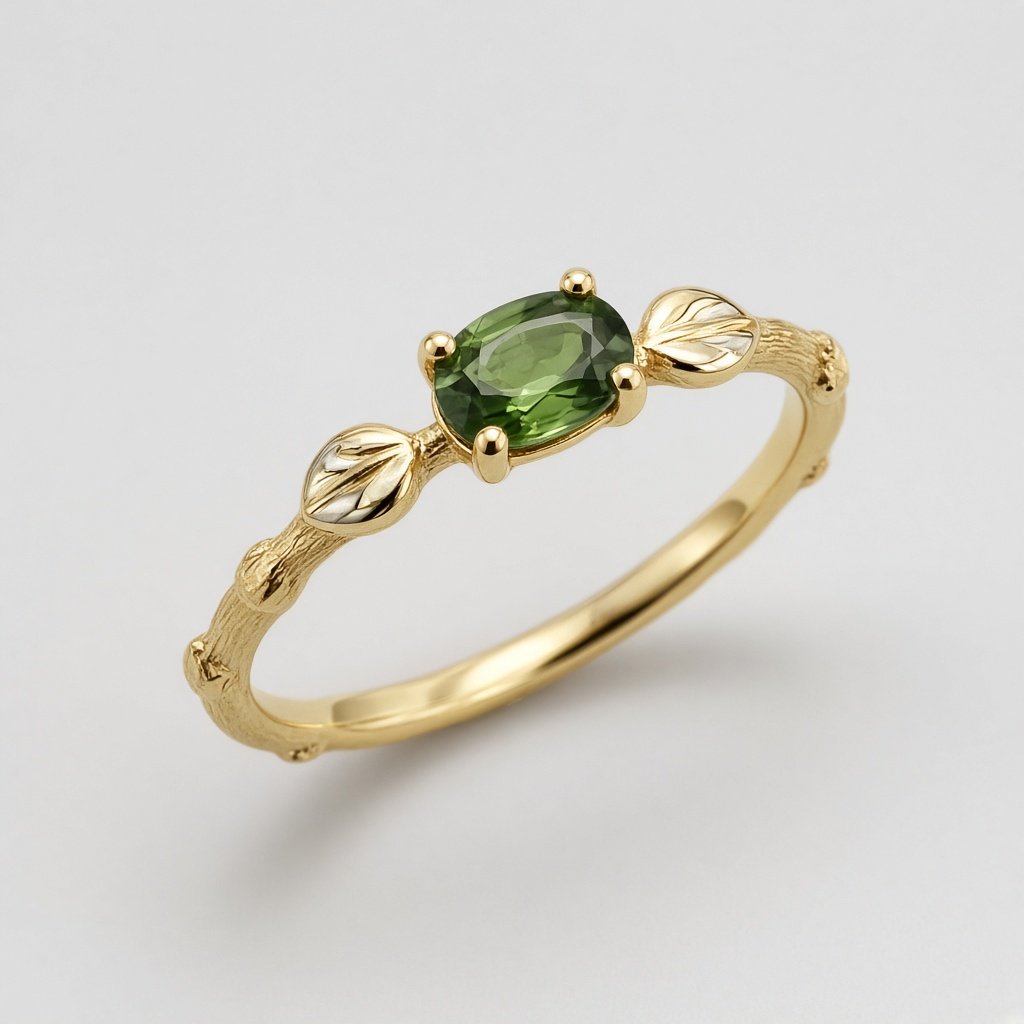
This image was generated using the prompt above.
Examples
Example Input
PieceType: ring, US size 6.5
Metal: 14k yellow gold, satin finish on the band, polished prongs
Stones: one oval green tourmaline, 6 x 4 mm
Motif: a twig band with two small leaves on the shoulders, for a couple who met hiking
WearLife: everyday wear by a gardener who works with her hands
RenderStyle: photoreal product render, three-quarter view, soft studio light, light gray background
AvoidList: no engraving text, no extra stones, nothing that looks like a known brand's signature design
Example Output
1. DESIGN BRIEF
A 14k yellow gold ring whose band looks like a slim twig, with a single oval green tourmaline held at the top and one small leaf on each shoulder. Satin twig texture, polished prongs, made for everyday wear.

2. SPEC SHEET (approximate, for the jeweler to confirm)
Metal: 14k yellow gold (58.3 percent gold). Finish: satin band, polished prongs and leaves.
Stone: 1 oval green tourmaline, 6 x 4 mm, set lengthwise along the finger.
Setting: 4 prongs, low profile so it sits closer to the hand.
Band: about 2 mm wide, twig texture with small knots; ring size US 6.5.
Leaves: 2, one per shoulder, about 3 mm long, gently domed, not sharp-tipped.
Carat weight: depends on the stone's depth; ask your stone supplier.

3. WEAR AND MAKE CHECKS
- Tourmaline is about 7 to 7.5 on the Mohs scale: fine for daily wear with care, but hard knocks can chip it. For gardening, suggest taking the ring off or choosing a bezel (see variation 1).
- Leaf tips and twig knots can snag gloves; keep them rounded.
- Ask the jeweler: minimum band thickness for a textured 2 mm band in 14k; whether 4 prongs are enough for this stone and wear; whether the twig texture can be resized later.

4. RENDER PROMPT
Photoreal product render of a slim 14k yellow gold ring shaped like a twig with small knots and a satin texture, one oval green tourmaline held lengthwise by four polished gold prongs at the top, one small domed polished gold leaf on each shoulder of the band, three-quarter view, soft even studio lighting with gentle reflections, plain light gray background, sharp focus, macro product photography.

5. VARIATIONS
Simpler: "the oval green tourmaline sits in a smooth polished gold bezel instead of prongs, no leaves".
More detailed: "add three tiny leaves climbing each shoulder, with fine vein lines on each leaf".

6. AVOID LIST
no text, no engraving, no letters, no hallmark stamp, no logo, no extra stones, no diamonds, no box, no hand, no brand signature design

7. RENDER CHECK LIST
- Exactly 1 green oval stone, set lengthwise.
- Exactly 4 prongs, polished.
- Yellow gold color, satin band.
- 1 leaf on each shoulder (2 in total).
- No text or extra stones. If any detail is wrong, fix that one line in the prompt and regenerate.