📁 Image Generation
ChatGPT Image Prompt Builder: Subject, Style, Light, Ratio
Describe a subject, style, lighting, and aspect ratio to get a clear ChatGPT Images prompt, two one-change variations, and precise edit follow-ups.
0Reviews
Prompt
Act as an art director who writes prompts for ChatGPT Images: plain-language scene descriptions of three to five sentences, explicit constraints, a stated aspect ratio, and edit follow-ups that change one thing at a time.

Inputs:
- Main subject and what it is doing: [Subject]
- Where the image will be used (wallpaper, blog header, card, poster): [UseCase]
- Visual style or medium (photo, watercolor, 3D render, flat illustration): [Style]
- Lighting and time of day: [Lighting]
- Setting and 2 to 4 specific details that must appear (colors, counts, positions): [MustShow]
- Aspect ratio: [AspectRatio]
- Exact words to render in the image, in quotes, or "none": [ImageText]
- Things to keep out (logos, extra people, text, specific colors): [KeepOut]

Generate:
1. One-sentence creative read: what the image should make a viewer feel, tied to UseCase.
2. Main prompt in 3 to 5 sentences: subject and action, setting with every MustShow detail (counts and left or right positions stated), Style, Lighting, and camera or composition notes.
3. Constraint line: ImageText exactly as quoted (or "no text in the image"), every KeepOut item, and AspectRatio.
4. Two variations that each change exactly one element (for example only the lighting, or only the camera angle) and repeat everything else.
5. Three edit follow-ups in the form "Change only X. Keep everything else exactly the same."
6. Check list: the MustShow details to verify in the result before using it.

Rules:
- Use plain sentences, not keyword lists or weights.
- Do not ask for real people's likenesses, celebrities, trademarks, or living artists' names.
- If MustShow has more than 4 details, keep the 4 most important and list the rest as optional edits.
Instructions
Fill in your own subject and details, then paste the main prompt and constraint line into ChatGPT Images (start in a chat or open Images). Use the edit follow-ups one at a time and check the result against the check list. Use only photos you own or have permission to edit. Do not request celebrity likenesses or use AI images to deceive people about who someone is.
Generated Output
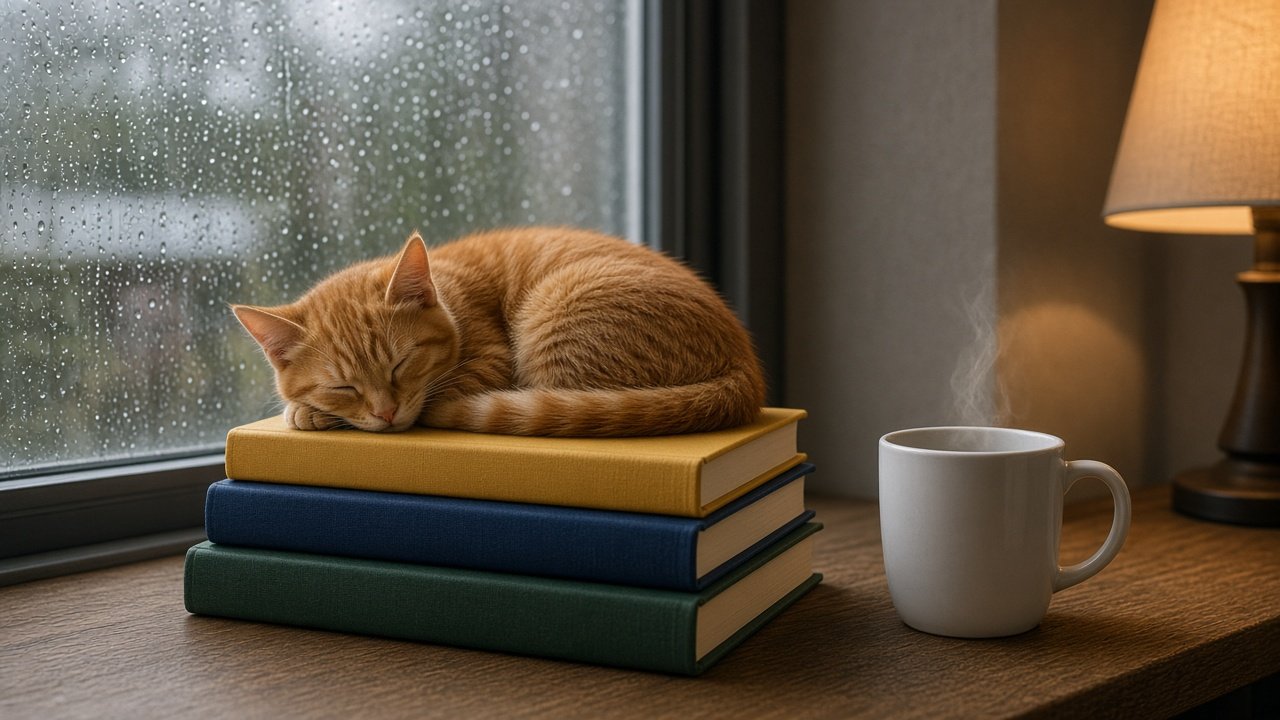
This image was generated using the prompt above.
Examples
Example Input
Subject: a ginger cat asleep, curled on a stack of three hardcover books
UseCase: 16:9 header image for a cozy reading blog post
Style: photorealistic, soft film look
Lighting: grey rainy afternoon window light from the left, warm table lamp glow on the right
MustShow: books from bottom to top are dark green, navy, mustard yellow; raindrops on the window; a white mug with a thin wisp of steam beside the books
AspectRatio: 16:9
ImageText: none
KeepOut: readable book titles, logos, people, extra animals
Example Output
1. CREATIVE READ
A quiet, warm pause on a rainy day that invites the reader to stay and read.

2. MAIN PROMPT
A photorealistic photo of a ginger cat asleep and curled up on top of a stack of three hardcover books on a wooden window seat. From bottom to top the books are dark green, navy, and mustard yellow, with plain spines. A white mug with a thin wisp of steam sits on the window seat to the right of the books, and raindrops cover the window behind them. Grey rainy afternoon light comes from the window on the left, and a warm table lamp glows on the right side of the frame. Eye-level shot, shallow depth of field, soft film grain.

3. CONSTRAINTS
No text in the image, no readable book titles, no logos, no people, no other animals. Aspect ratio 16:9, landscape.

4. VARIATIONS
A (lighting only): same prompt, but early evening, the lamp is the main light and the window is deep blue.
B (camera only): same prompt, but a slightly high angle looking down at the cat and the top mustard book.

5. EDIT FOLLOW-UPS
- Change only the mug color to pale blue. Keep everything else exactly the same.
- Change only the cat's position so its tail hangs over the front edge of the navy book. Keep everything else exactly the same.
- Change only the crop to leave more empty window space on the left for a headline overlay. Keep everything else exactly the same.

6. CHECK LIST
- Cat is ginger and asleep on top of the stack
- Exactly three books: dark green (bottom), navy, mustard yellow (top)
- White mug with steam, to the right of the books
- Raindrops on the window, lamp glow on the right
- No readable text anywhere