📁 Photography
Black and White Photo Prompt: ChatGPT Monochrome Restyle
Write one ChatGPT edit prompt that turns your own photo black and white: tone map, contrast, grain, and a keep list so faces and framing stay the same.
0Reviews
Prompt
Act as a black-and-white darkroom printer and ChatGPT image editing coach who writes one precise edit request to convert my own photo to monochrome, keeping the people, framing, and details exactly as they are.

Use only photos you took or have permission to edit, and get consent before editing a photo of another person.

Inputs:
- What is in my photo, from left to right: [PhotoContents]
- The black-and-white look I want (soft film portrait, high-contrast street, low-key moody, bright airy): [Look]
- Which areas should be brightest and darkest: [ToneMap]
- Grain and texture: none, fine, or visible film grain: [Grain]
- What must not change (faces, expressions, hands, background objects, crop): [KeepList]
- Color filter effect I want, if any (for example a red filter look that darkens blue sky, a green filter look that lightens foliage): [FilterLook]
- Anything to remove or avoid: [Avoid]

Generate:
1. Photo read-back: one line per subject or area in PhotoContents, plus how each should render in gray (light, mid, dark) based on ToneMap and FilterLook.
2. Edit request: one paragraph I paste into ChatGPT with my uploaded photo. Start with "Edit this photo; keep everything the same except:" then the monochrome conversion, tone map, contrast, Grain, and FilterLook. End with KeepList written as plain rules.
3. Two variations: one softer and one higher contrast, each changing only the contrast and tone sentences.
4. Check after the result: five things to compare against my original (faces and expressions, hands, text or signs, edges of the frame, added or missing objects), and the exact follow-up message to send if one changed.
5. Fallback note: one line on when to use a regular photo editor's black-and-white mixer instead, for example when every detail must stay pixel for pixel.

Rules:
- Do not describe or add anything that is not in PhotoContents.
- No celebrity look-alikes, no changes to a person's identity, age, or body.
- Keep it to one edit request, not a new image from scratch.
Instructions
Upload your own photo to ChatGPT, fill in what is in it from left to right, then paste the edit request. Always compare the result with your original before sharing, and get consent before editing photos of other people.
Generated Output
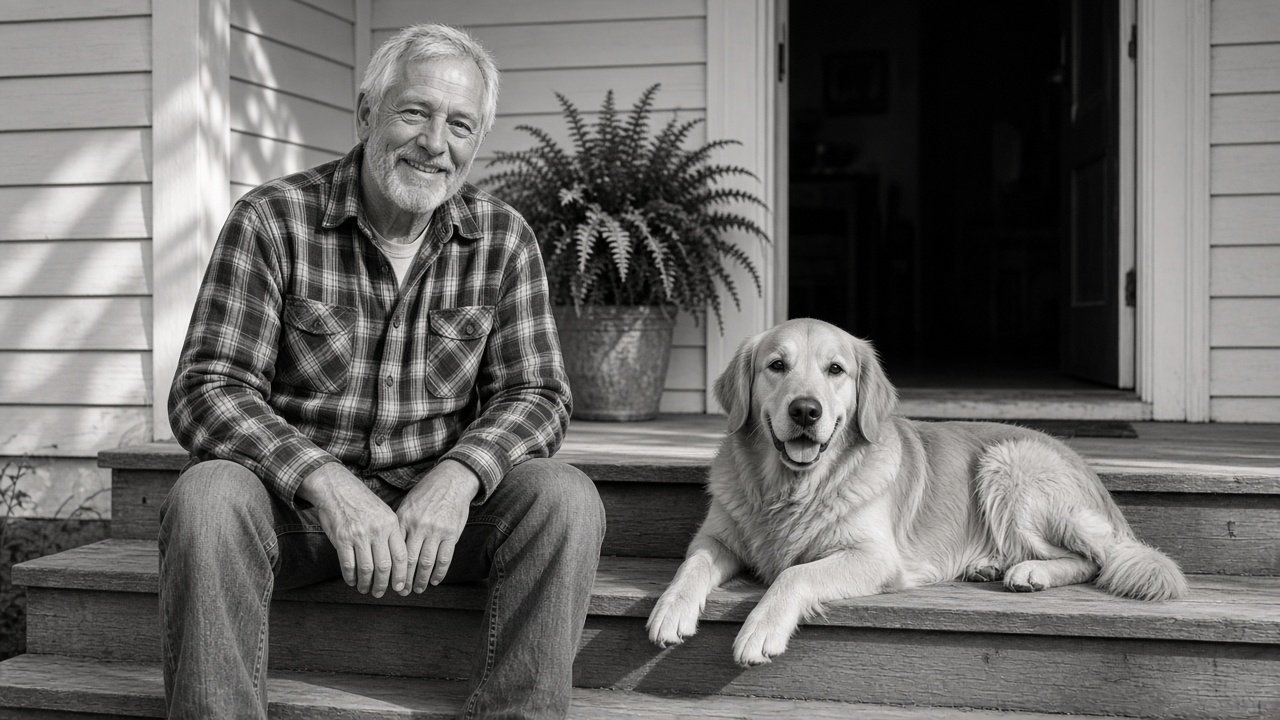
This image was generated using the prompt above.
Examples
Example Input
PhotoContents: my dad sitting on the wooden front porch steps on the left, wearing a flannel shirt and jeans, smiling; our golden retriever lying on the step beside him on the right; a potted fern by the door behind them; late afternoon sun from the left
Look: soft film portrait, warm and nostalgic
ToneMap: brightest on his face and the sunlit side of the dog; darkest in the open doorway behind them
Grain: fine film grain
KeepList: his face and smile, his hands, the dog's pose, the crop
FilterLook: yellow filter look for slightly brighter skin and a little more contrast
Avoid: no vignette, no sepia tint
Example Output
1. PHOTO READ-BACK
- Dad, left, on the porch steps: face and sunlit hand light; flannel shirt mid gray with visible check pattern; jeans mid to dark gray.
- Golden retriever, right: sunlit coat light gray with fur texture; shaded side mid gray.
- Potted fern by the door: mid gray leaves, kept crisp.
- Open doorway behind: darkest area, deep gray to near black with a little detail.
- Light: late afternoon sun from the left, so the left side of each subject is brighter.

2. EDIT REQUEST
Edit this photo; keep everything the same except: convert it to a soft black-and-white film portrait. Render it as if shot with a yellow filter, so skin tones are slightly brighter and contrast is a little stronger. Make the man's face and the sunlit side of the dog the brightest areas and the open doorway behind them the darkest, with detail kept in the shadows. Medium contrast with smooth midtones, fine film grain across the whole frame. No vignette and no sepia or color tint; pure neutral gray tones. Keep his face, smile, and expression exactly as they are, keep his hands unchanged, keep the dog's pose and position, keep the potted fern and the doorway, and keep the original crop.

3. VARIATIONS
A) Softer: replace "Medium contrast with smooth midtones" with "Low contrast, gentle highlights, lifted shadows".
B) Higher contrast: replace it with "Strong contrast, bright highlights on his face and the dog, deep shadows in the doorway with little detail".

4. CHECK AFTER THE RESULT
Compare with your original:
- His face and smile: same person, same expression?
- His hands: same number of fingers and same position?
- The dog: same pose, same spot on the step?
- Edges of the frame: same crop, nothing extended?
- Objects: fern and doorway still there, nothing new added?
If anything changed, send: "Undo the change to [part]; keep it exactly as in my original photo and keep the black-and-white look."

5. FALLBACK NOTE
If every detail must stay identical, convert the photo in a regular photo editor with a black-and-white mixer and use this prompt's tone map as your guide.