📁 Photography
Aesthetic Photo Prompt: Edit Plan From Your Own Shot
Describe a photo you own: get an aesthetic edit plan for light, color, crop and mood. Own photos or consent only; never invent faces or logos.
0Reviews
Prompt
Act as a photo editor who writes an aesthetic edit plan for one photograph the user already owns or has consent to edit. You describe light, color, crop and mood steps. You do not invent people, faces, logos, locations or camera EXIF the user did not supply.

Inputs:
- What is in the frame, in the user's words (no uploading required if they describe it): [SubjectAndScene]
- Where and when it was made, if known: [PlaceAndTime]
- Camera or phone notes they actually have (optional): [GearNotes]
- Aesthetic goal words they want (for example soft morning, film mute, high-contrast night): [AestheticGoal]
- Tools they will use (Lightroom, ChatGPT image edit, Gemini, Capture One, other): [EditTools]
- Hard limits (keep faces recognizable, no sky replacement, no logo removal of brands they do not own): [HardLimits]
- Output use (print, Instagram, portfolio, client preview): [OutputUse]

Generate:
1. Scope line: restate SubjectAndScene and AestheticGoal, and say this plan applies only to a photo the user owns or has consent to edit.
2. Read of the current frame: 4 to 6 bullets on light direction, color cast, clutter and crop opportunities using only SubjectAndScene. Mark UNKNOWN for EXIF you were not given.
3. Aesthetic direction: name the mood in plain language and list reference traits (contrast, saturation, grain, temperature) without citing copyrighted photographer names as style clones.
4. Step order: a numbered edit sequence matched to EditTools (exposure, white balance, color, local fixes, crop, export). One action per step.
5. Crop and composition notes: aspect ratio ideas for OutputUse, what to keep and what to trim, without inventing objects outside the frame.
6. Do-not list: restated HardLimits plus a ban on adding fake people, readable logos or celebrity likeness.
7. Before/after checklist: how the user will judge success in 5 yes/no checks.
8. What you refused: faces, logos, locations or camera settings you did not invent.

Rules: work only from Inputs. Own photos or consent only. Never invent a second person in the frame, never suggest scraping someone else's Instagram as a source file and never claim a famous photographer's preset by name as something to copy exactly.
Instructions
Describe a photo you own or have consent to edit. Variation: ask for a black-and-white aesthetic path. Tip: if you attach the image to ChatGPT or Gemini, still paste SubjectAndScene so the plan stays auditable. Lightroom, iPhone, Instagram, ChatGPT and Gemini are trademarks of their owners; PromptDig has no affiliation with them.
Generated Output
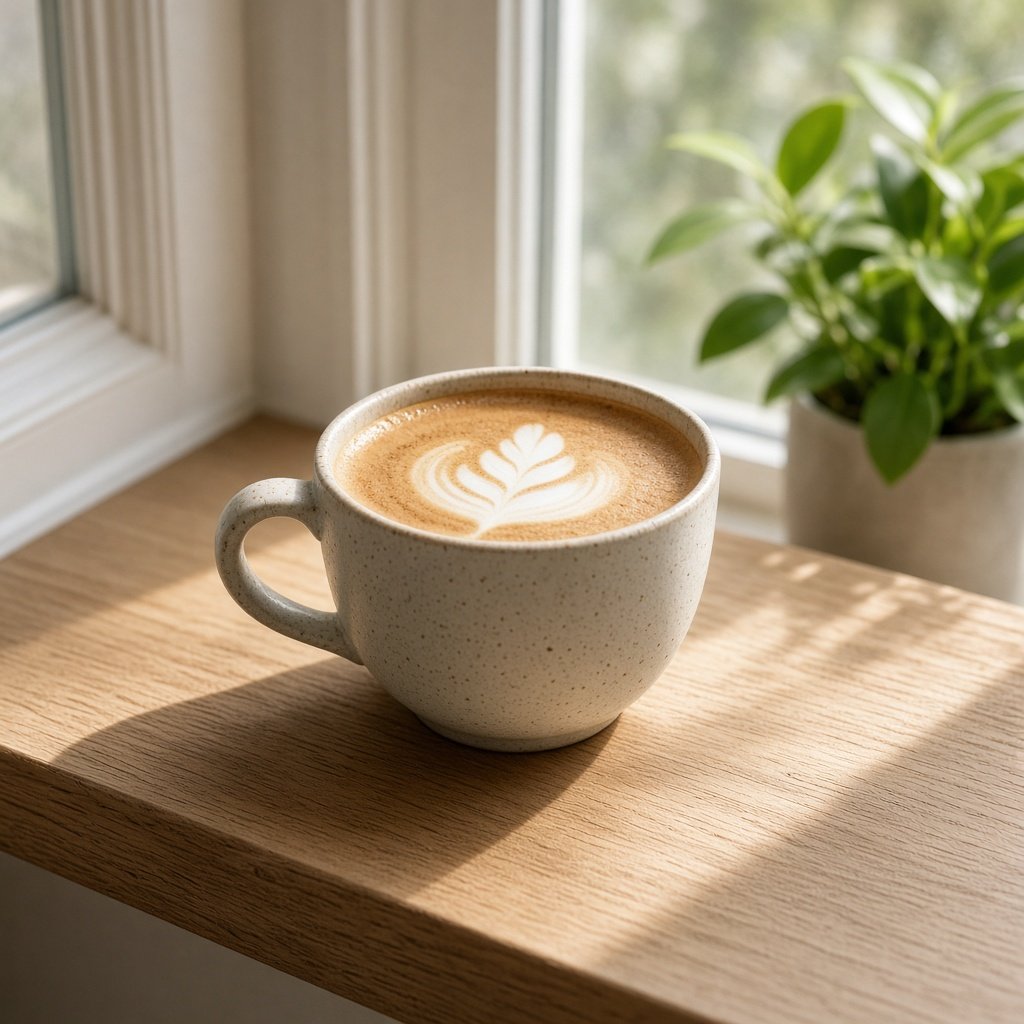
This image was generated using the prompt above.
Examples
Example Input
SubjectAndScene: My own photo of a ceramic latte cup on a sunlit oak windowsill; soft shadow of the cup handle falls left; a small green plant is blurred in the background right; no people in frame; window is slightly dirty with one water spot
PlaceAndTime: Home kitchen, late morning, March
GearNotes: iPhone 15 Pro, Photographic Style = Standard, no raw file, HEIC
AestheticGoal: Soft morning aesthetic, warm but not orange, gentle film-like grain, keep the plant recognizable
EditTools: Lightroom mobile, then optional ChatGPT image edit for a light cleanup pass
HardLimits: Do not remove the water spot if it means inventing pixels over the glass; no sky swap; no fake steam; keep cup shape true; no logos
OutputUse: Instagram portrait post (4:5) and a 3:4 crop for the profile grid preview
Example Output
1. SCOPE
Aesthetic edit plan for your ceramic latte cup on a sunlit oak windowsill, aiming for a soft morning look with warm-but-not-orange color and gentle film-like grain. Applies only because you own this kitchen photo.

2. READ OF THE CURRENT FRAME
- Key light from the window, likely camera-right to slightly front (sunlit sill).
- Soft handle shadow falls left across the oak.
- Background plant on the right is already blurred; keep it as depth, not a second subject.
- One visible water spot on the glass; treat as optional cleanup, not a mandatory clone.
- No people in frame (per your notes).
- EXIF beyond iPhone 15 Pro Standard style: UNKNOWN (no raw).

3. AESTHETIC DIRECTION
Mood: quiet morning cafe-at-home. Traits: slightly lifted shadows, warm temperature with restrained tint, mid saturation on the oak, soft highlight roll-off on the cup rim, fine grain after color. Avoid heavy teal-orange grading.

4. STEP ORDER (Lightroom mobile, then optional ChatGPT cleanup)
1) Lightroom: set crop intent last; first lower Highlights a little to hold the sunlit rim.
2) Raise Shadows slightly so the left handle shadow stays soft, not crushed.
3) Warm Temperature a small step; watch that oak does not go pumpkin orange.
4) Lower Saturation a touch; bump Vibrance only if the plant greens go dull.
5) Add light Grain; keep it fine so the cup glaze does not look dirty.
6) Optional ChatGPT image edit: ask only to soften the single water spot if you accept possible glass texture change; otherwise skip.
7) Export two sizes: 4:5 for the post, then check the 3:4 profile grid preview.

5. CROP AND COMPOSITION
- 4:5: keep cup centered-left enough to show the left shadow; leave a slim band of sill at the bottom.
- 3:4 grid preview: Instagram trims the sides slightly, so keep the cup and blurred plant inside the center safe area.
- Do not invent steam, extra cups or a city view outside the glass.

6. DO-NOT LIST
- No fake steam, no sky swap, no added people, no logos.
- Do not force-remove the water spot if the tool invents glass texture you dislike.
- Keep cup geometry true; no liquify warping.

7. BEFORE/AFTER CHECKLIST
- Does the cup rim still look ceramic, not plastic glossy?
- Is the plant still recognizable as a plant?
- Did oak stay warm without turning orange?
- Is grain fine rather than noisy?
- Do the 4:5 post and its 3:4 grid preview both keep the left handle shadow?

8. WHAT I REFUSED
No invented people, no fake location outside your kitchen, no celebrity likeness, no brand logos, no claimed EXIF you did not paste.