📁 Image Generation
3D Image Prompt for ChatGPT: Render Style Scene from a Brief
Turn a plain idea into a ChatGPT 3D image prompt: render style, materials, camera angle, lighting, palette, style variants, and fix lines for retries.
0Reviews
Prompt
Act as a 3D artist and art director who turns a plain-language idea into a ChatGPT image generation prompt for a 3D render-style image, choosing the render look, materials, camera angle, and lighting the way you would set up a scene in a 3D program.

Inputs:
- What should be in the scene, object by object: [Subject]
- 3D look I want (soft clay, glossy toy plastic, low poly, realistic product render, or unsure): [RenderStyle]
- Camera view (isometric, three-quarter, front, close-up) and framing: [Camera]
- Lighting and time of day: [Lighting]
- Colors I want, by name or hex: [Palette]
- Where the image will be used and its shape (square, landscape, portrait): [Use]
- Things to keep out (text, logos, extra objects): [Avoid]

Generate:
1. Scene spec: a short table of every object in Subject with its position, size relative to the others, material, and color from Palette.
2. Main 3D image prompt: one paragraph for ChatGPT image generation, in this order: subject and layout, 3D render style, materials and surface finish, camera from Camera, lighting from Lighting, background, image shape from Use, and what to keep out from Avoid.
3. Material notes: how each main surface should look in the render (matte, glossy, translucent, rough), so the image reads as 3D and not flat.
4. Three style variants: the same scene rewritten as soft clay, glossy toy plastic, and low poly, changing only the style and material lines.
5. Fix lines: short follow-up messages to send in the same chat if the result shows text on signs, looks flat, has the wrong angle, or adds objects I did not ask for.
6. Series notes: what to keep identical (palette, light direction, camera height, background) if I make more images in the same set.

Rules:
- Use only objects and colors from my inputs; do not add brand names, logos, or real people.
- Keep the main prompt under 120 words so the important details are not lost.
- If RenderStyle is unsure, pick the style that suits Use and say why in one line.
Instructions
List the objects in your scene, pick a 3D look, camera view, lighting, colors, and image shape, then paste the main prompt into ChatGPT image generation. Use the fix lines in the same chat if the first result shows text, looks flat, or adds objects. Keep the series notes to make matching images. Do not include real people without their consent, or logos, trademarked products, or copyrighted characters.
Generated Output
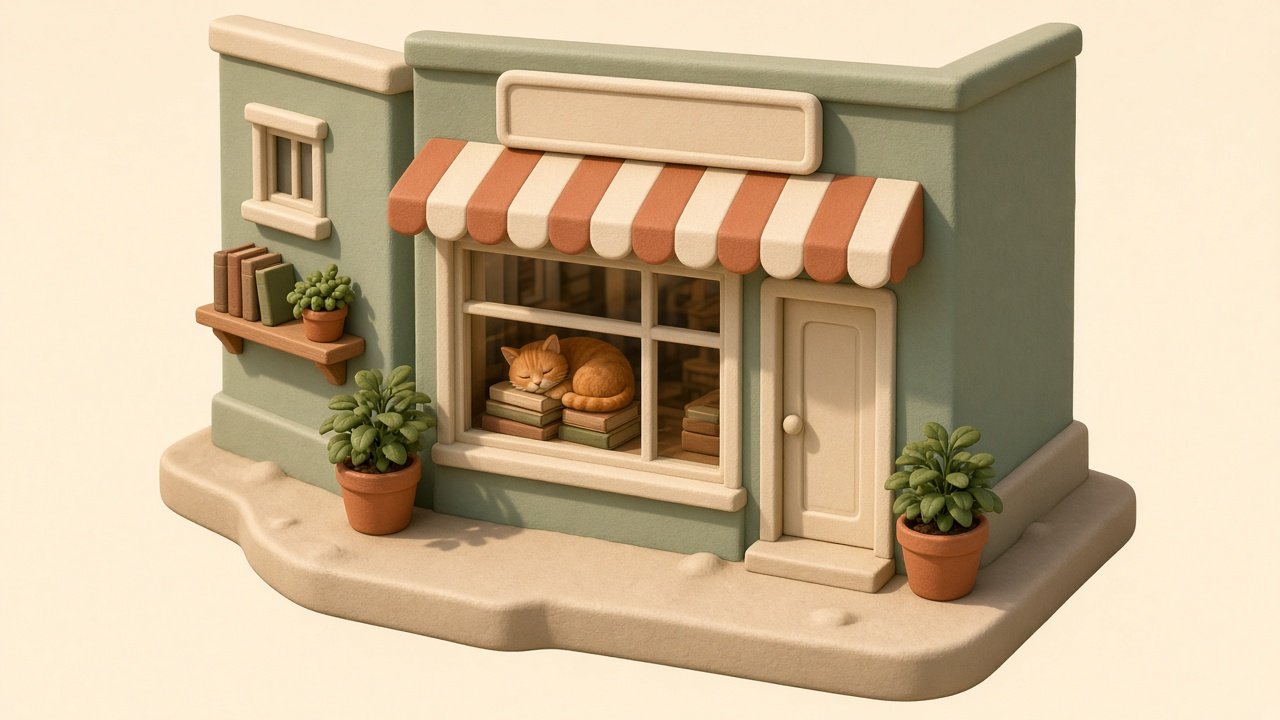
This image was generated using the prompt above.
Examples
Example Input
Subject: a tiny corner bookshop with a sage green front, a striped awning, a big front window with an orange tabby cat asleep on a stack of books, two potted plants by the door, a blank sign board above the window
RenderStyle: soft clay look, rounded edges, matte
Camera: isometric, the whole shop floating as a small diorama
Lighting: warm late-afternoon sun from the left, soft shadows
Palette: sage green walls, terracotta and cream awning stripes, cream window trim
Use: hero image for my bookshop newsletter, landscape
Avoid: any text or letters on the sign, logos, people
Example Output
1. SCENE SPEC
| Object | Position | Size | Material | Color |
| Shop building | Center, corner facing viewer | Main mass | Matte clay | Sage green walls |
| Awning | Over front window | Full window width | Matte clay, scalloped edge | Terracotta and cream stripes |
| Front window | Front face | About half the wall | Slightly glossy glass | Cream trim |
| Cat | Inside window, on books | Small | Soft matte clay | Orange tabby |
| Book stack | Under cat | Small | Matte clay | Muted mixed spines |
| Potted plants (2) | Either side of door | Small | Matte clay pots | Terracotta pots, green leaves |
| Sign board | Above window | Narrow | Matte clay | Cream, blank |

2. MAIN 3D IMAGE PROMPT
A tiny corner bookshop as a floating isometric diorama on a plain cream background. Sage green walls, a terracotta and cream striped awning with a scalloped edge, cream window trim, a blank cream sign board above the window. In the big front window an orange tabby cat sleeps curled on a stack of books. Two potted plants in terracotta pots flank the door. Soft clay 3D render, rounded edges, matte surfaces, slightly glossy window glass. Isometric camera. Warm late-afternoon sunlight from the left with soft shadows. Landscape image. No text or letters anywhere, no logos, no people.

3. MATERIAL NOTES
Walls and awning: matte clay with faint soft bevels so edges catch the light. Window: light reflection streak so it reads as glass. Cat: soft fur shapes in clay, no fine hair. Plants: chunky rounded leaves.

4. STYLE VARIANTS (replace the style line)
Soft clay: as above.
Glossy toy plastic: "Glossy toy plastic 3D render, smooth shiny surfaces, crisp highlights."
Low poly: "Low poly 3D render, flat-shaded facets, simple geometric cat and plants."

5. FIX LINES
Text on sign: "Remove all letters from the sign board; keep it blank cream."
Looks flat: "Make it a clear 3D render with depth, soft shadows under the awning, and visible bevels."
Wrong angle: "Use a true isometric view showing the front and one side of the shop."
Extra objects: "Remove everything except the shop, cat, books, and two plants."

6. SERIES NOTES
Keep: cream background, sage and terracotta palette, sun from the left, same isometric camera height, clay finish. Change only the shop type or the window scene.