Nano Banana Prompts for Realistic Photos: 12 to Copy
12 Nano Banana prompts for realistic photos in Gemini: portraits, food, products, interiors, and street scenes written with camera, lens, light, and texture.
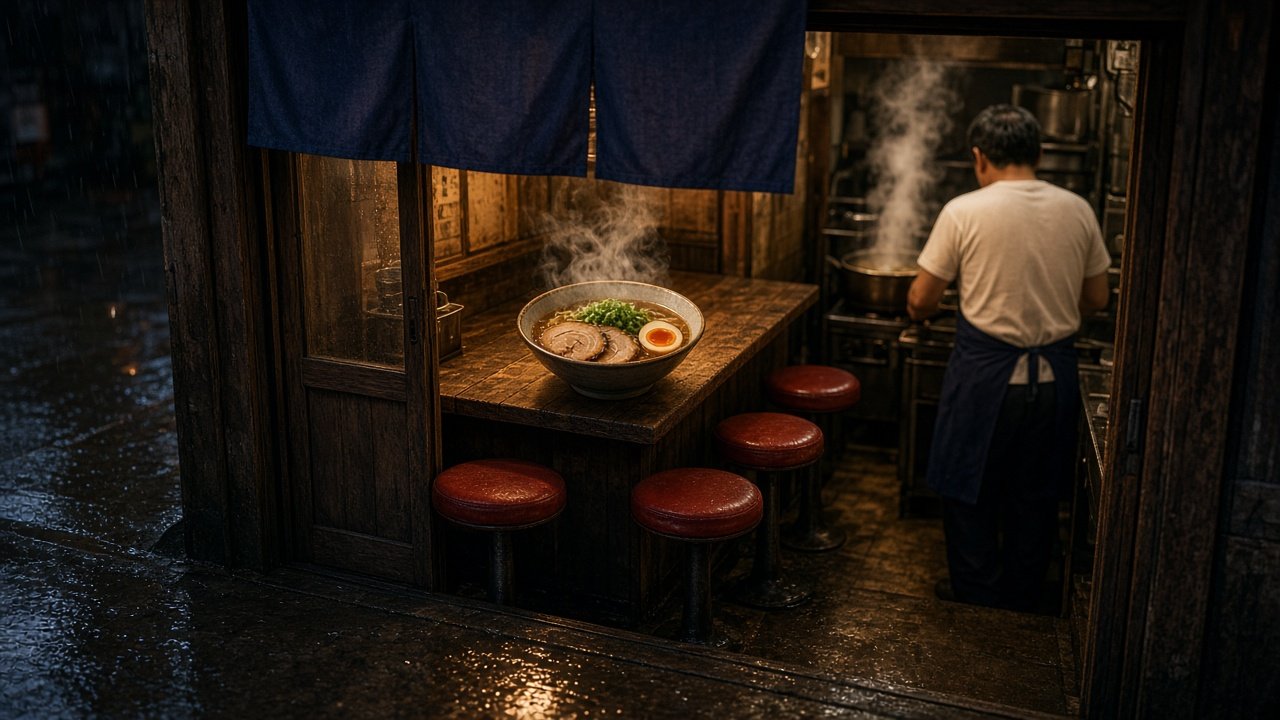
Nano Banana prompts for realistic photos work when you write like a photographer instead of listing keywords: name the shot type, the subject and what it is doing, the place, the light, the camera and lens, and the textures you want to see. Paste any prompt below into the Gemini app or Google AI Studio, replace the [brackets], and refine with one follow-up edit at a time. Below are 12 copy-paste prompts grouped by subject, plus a flagship prompt that turns a plain scene idea into a full photo brief.
Nano Banana is Google's name for Gemini's native image models. The current lineup is Nano Banana 2.1, Nano Banana 2 Lite, and Nano Banana Pro (Gemini 3 Pro Image); the original Nano Banana (Gemini 2.5 Flash Image) and Nano Banana 2 (Gemini 3.1 Flash Image) are older versions. The prompts below work with any of them. Do not use a real person's likeness without their consent, skip celebrities and brand logos, never make an image meant to pass as a real photo of a real person or event, and label AI images when you share them.
Four habits that make Nano Banana photos look real
- Camera language: "35mm lens at f/2, handheld at eye level" does more than "realistic, 8k".
- Light with a direction: say where it comes from, its color, and whether it is soft or hard.
- Texture and wear: scratches, creases, pores, steam, dust, and fingerprints break the rendered look.
- Positive framing: Google's prompting guide suggests describing what you want, such as "an empty street", rather than "no cars".
People and portraits
1. Environmental portrait
Create a photorealistic environmental portrait of [fictional person: age, look, clothes] [doing what] in [workplace]. Window light from the [side], 50mm lens at f/2.8, eye level, natural skin texture with visible pores, background slightly soft. [aspect ratio].
2. Candid street moment
Create a candid street photo of [fictional person] [action] on [street, city type, time of day]. Shot from across the street on a 35mm lens, slight motion blur on passing people, uneven shop light, wet or dusty pavement. [aspect ratio].
3. Hands at work
Create a close-up photo of two hands [task, for example kneading bread] on [surface], five fingers on each hand, flour and creases on the skin, soft side light, macro lens, shallow depth of field.
Food and products
4. Food on a real table
Create a photorealistic overhead photo of [dish with every component and count] on [table material], with crumbs, a used napkin, and [drink]. Soft daylight from the left, natural color, glossy sauce and real steam. [aspect ratio].
5. Product in use
Create a lifestyle photo of [product, described without brand names] being used in [room] by [fictional person or no people]. Keep the product's shape and colors: [details]. Morning light, 35mm lens, everyday mess in the background.
6. Clean packshot
Create a studio packshot of [product with exact colors and parts] on a [color] seamless background, softbox light from above and left, a soft shadow under the product, sharp edges, true-to-life color. [aspect ratio].
Places and interiors
7. Lived-in interior
Create a photorealistic interior photo of a [room] with [furniture and counts], a throw blanket left on the sofa, a half-read book, plants with a few brown leaves, afternoon light through [window type], 24mm lens at chest height.
8. Landscape at golden hour
Create a landscape photo of [place type] at golden hour, low sun from the [side], long shadows, haze in the distance, foreground [rocks or grass] in sharp focus, 24mm lens on a tripod. [aspect ratio].
9. Rainy night scene
Create an eye-level night photo of [place] in steady rain, warm light from [source] reflecting on wet pavement, raindrops as short streaks, plain signs without lettering, 35mm lens at f/2.
Camera looks
10. Phone snapshot
Create a casual smartphone photo of [scene], taken quickly at arm's length, slightly crooked framing, mixed indoor light, a little noise in the shadows, everything in focus.
11. Disposable camera flash
Create a photo of [scene] that looks like it was taken on a cheap disposable film camera with direct flash at night: hard shadows behind people, slight red-eye, grain, warm color cast.
Fixing the rendered look
12. Make it look like a real photo
Keep everything in this image the same except make it look like a real photo: add natural skin and surface texture, soften the perfect symmetry, make the light uneven with [direction], and add small signs of use on [objects].
Build a full photo brief with the flagship prompt
The Nano Banana Realistic Photo Prompt: Camera, Light, Texture takes your scene idea, every subject with counts and positions, place and time, camera look, things to avoid, and aspect ratio. It returns a scene lock, one Nano Banana prompt in photographer order, a realism layer, a positive rewrite of your "no" list, three one-change edits, and a check list. In its example, a rainy-night ramen counter keeps exactly one bowl, three red stools, and one cook with his back turned, and "no text on the curtain" becomes "a plain, faded indigo fabric curtain".
More Gemini image prompts
For product stills from a SKU or scene brief, use the Nano Banana 2 scene still compiler and read Nano Banana 2 packshots with lock lists. To edit a photo you already have, see Gemini Prompts for Image Editing. For portrait ideas, browse ChatGPT Image Prompts for Men.
Find more in the Image Generation category, look through Browse, or post your own on Share.